Google Flights AI Flight Deals: 25 Prompts That Actually Find Cheap Fares

Copy these 25 ready-to-use Google Flights AI prompts to find cheap fares fast. Add a budget, trip length, and constraint for the best results.
Google Flights now has an AI tool that reads plain English. You just describe your trip, and it finds the deals. However, to get the most out of this AI feature, you need the exact prompts that bring results.
So, in this guide, we give you 25 prompts that work and get you the best flight deals on Google Flights.
Also, you’ll learn how to phrase requests, what to avoid, and which details matter most. Better yet, every prompt here is ready to copy and paste.

What is Google Flights AI Flight Deals?
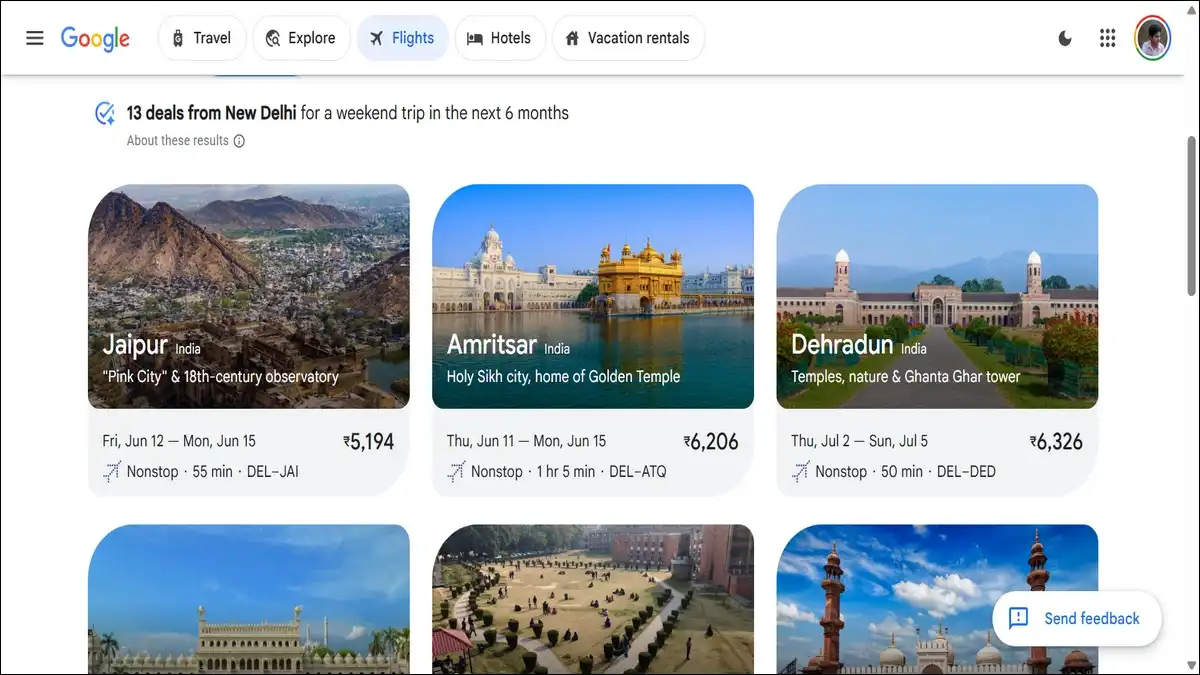
Flight Deals is an AI-powered search tool inside Google Flights. You type your trip in plain language, and it finds budget-friendly options that match.
Here’s the difference: it skips the usual filters and date pickers. Instead, you write the way you’d talk. The AI reads your intent and surfaces deals.
The tool reached users worldwide in late 2025. According to TechCrunch, Google expanded Flight Deals globally in November 2025. It first launched in the US, Canada, and India that August.
Flight Deals is built for flexible travellers. It works best when saving money beats everything else. So it’s perfect for open-minded trip planning.
Wondering where to find it? You’ll see it on the dedicated Flight Deals page. It also sits in the top-left menu on Google Flights, and both lead to the same tool.
How does Flight Deals work behind the scenes?
Flight Deals uses AI to read your request, then pulls live details like prices. Then, it connects directly to Google Flights data, so the deals you see are real and current.
The tool understands fuzzy input. You can say “somewhere warm” without naming a city. And it interprets the meaning and suggests destinations.
It also respects your constraints; for example, you mention nonstop, and it filters out connections. Add a budget, and it stays under your cap.
One detail sets it apart from generic chatbots. It surfaces fares meaningfully below the usual price. In short, the goal is genuine savings, not just options.
Why use AI prompts instead of normal search filters?
AI prompts win when your plans are flexible; you skip the click-heavy filter process and find destinations you’d never search for.
While normal search needs a fixed destination and dates. Flight Deals doesn’t need them. So you can leave both open and still get results.
Here’s the trade-off in plain terms.
| Approach | Best for | Weakness |
|---|---|---|
| AI Flight Deals | Flexible trips, inspiration, budget-first | Less precise for fixed dates |
| Standard search | Exact route and dates | More clicks, no surprises |
In our experience, the prompt method shines for “I want to go somewhere cheap” trips. The filter method, on the flip side, wins when you already know the plan.
List of 25 Best Google Flights AI Flight Deals Prompts For Cheap Bookings
The best prompts combine a budget, a trip length, and a constraint. Vague requests return weak results. Specific ones, though, sharpen the output fast.
We’ve grouped the prompts by goal below. Copy any of them, then swap in your own city and dates.
Budget-first prompts
These prompts lead with a price cap. They suit travellers who want the cheapest possible escape.
- “Cheap nonstop weekend trip from my city in October under $300”
- “Round-trip flight under $200 from [your city] anywhere this month”
- “Cheapest international trip under $600 from [your city] in spring”
- “Budget beach trip under $400 round-trip in November”
- “Find me a sub-$150 domestic flight for a long weekend”
Destination-flexible prompts
These leave the destination open. So Google suggests where your money goes furthest.
- “Somewhere warm in November under $600 with a beach”
- “A city with great food in April for under $1,000 round-trip”
- “Surprise me with a cheap European city in early spring”
- “Where can I fly cheaply from [your city] this weekend?”
- “Affordable mountain destination for a week in February”
Trip-type prompts
These describe the kind of trip you want. The AI then matches the vibe to a fare.
- “10-day ski trip to a world-class resort with fresh powder”
- “Relaxing 5-day island getaway under $700 round-trip”
- “Quick city break, nonstop, under 3 hours flight time”
- “Week-long cultural trip to a historic European capital”
- “Cheap nature trip near a national park this fall”
Time-flexible prompts
These keep dates loose. After all, flexibility usually unlocks the lowest fares.
- “Cheapest week to fly from [your city] to Tokyo this winter”
- “Any weekend in October with cheap flights to Mexico”
- “Flexible 7-day trip to Europe whenever it’s cheapest”
- “Best month to fly cheaply from [your city] to Bali”
- “A cheap trip sometime next month, dates flexible”
Constraint-heavy prompts
These stack multiple rules. Use them when comfort matters as much as price.
- “Nonstop trip under $500, no basic economy, in March”
- “Cheap round-trip with one carry-on included, under 6 hours”
- “Family of four, cheap nonstop beach trip in summer”
- “Direct flight, morning departure, under $400 round-trip”
- “Budget trip with a checked bag included, under $550”
The following grid shows five Google Flights AI prompt categories: budget, destination-flexible, trip-type, time-flexible, and constraint-heavy:
5 ways to prompt Google Flights AI Flight Deals
Budget-first
“Round-trip under $200 from my city anywhere this month”
Destination-flexible
“Somewhere warm in November under $600 with a beach”
Trip-type
“10-day ski trip to a resort with fresh powder”
Time-flexible
“Cheapest week to fly to Tokyo this winter”
Constraint-heavy
“Nonstop under $500, no basic economy, in March”
What makes a Flight Deals prompt actually work?
Good prompts share three traits: a budget, a trip length, and a clear constraint. Add all three, and results improve sharply. Drop them, and the AI just guesses.
Google itself stresses this point. As reported by BGR, the tool uses advanced AI to understand what you’re looking for. The richer your input, the better it identifies destinations.
So think of the prompt as a brief. You’re briefing a travel agent. More detail means a tighter match.
Here’s a simple formula to follow.
| Element | Example phrase |
|---|---|
| Budget | “under $400 round-trip” |
| Trip length | “for a long weekend” |
| Constraint | “nonstop only” or “no basic economy” |
| Vibe (optional) | “with a beach” or “great food” |
Put it together, and a complete prompt reads naturally. “Cheap nonstop long weekend under $400 with a beach.”
That single line gives the AI everything it needs to find the best deal for you!
Common Flight Deals prompt mistakes to avoid
- The biggest mistake is being too vague. So what goes wrong? “Find me a cheap flight” gives the AI nothing. Add a budget and a timeframe instead.
- Avoid contradictory constraints too. Asking for nonstop, ultra-cheap, and last-minute rarely works. Pick the rules that matter most.
- Don’t expect exact-date precision either. Flight Deals favours flexibility over fixed itineraries. For rigid plans, use the standard search.
- Finally, skip overly long prompts. Three or four clear details beat a paragraph. To put it simply, clarity outperforms length every time.
The two-stage booking routine
Discover with AI
Type a plain-language prompt in Flight Deals. Note the cheap destinations and fares it surfaces.
Confirm with search
Open standard Google Flights. Check the price calendar, then track the fare or book.
A two-step diagram showing AI Flight Deals discovery first, then standard Google Flights search to confirm the fare.
How Flight Deals fits a smart booking routine
Flight Deals works best as a first step, not the only step. Use it to discover routes and prices. Then verify before you book.
Start with a prompt to find cheap options. Note the destinations and fares it surfaces. This is your inspiration stage.
Next, open the standard Google Flights search. Check the price calendar for your chosen route. Turn on price tracking if you’re not ready.
This two-stage method covers both bases. The AI finds the idea. The standard tools confirm the deal.
Worth Knowing: Flight Deals isn’t replacing search filters. It’s adding a discovery layer on top. The smartest travellers use both, not one.
Where to find and access Flight Deals
You’ll find Flight Deals in two places on Google Flights. Both are quick to reach. And neither requires opting into any AI experiment.
Open the dedicated Flight Deals page directly. Or click the top-left drop-down menu on Google Flights, then select Flight Deals.
The tool works on desktop and mobile. Flight Deals is designed for flexible travellers whose top goal is saving money. So access stays simple by design.
It launched first in the US, Canada, and India. The global rollout followed in late 2025. Availability now reaches most regions.
Final thoughts: prompt your way to cheaper flights
Treat Flight Deals like a conversation with a travel agent. Give it a budget, a trip length, and a constraint. Then let the AI do the searching.
So where do you begin? Start with the prompts above. Swap in your city and dates. Adjust the wording until the results fit.
And remember the two-stage routine. Discover with AI, then confirm with standard search. That combination finds deals you’d otherwise miss.
The tool rewards flexibility most of all. The looser your plans, the better your fares. So stay open, and let the prompts work.
People Also Ask For
What is Google Flights AI Flight Deals?
It’s an AI-powered search tool inside Google Flights. You describe your trip in plain language, and it finds budget-friendly options using live Google Flights data. It’s built for flexible travelers whose top goal is saving money.
When did Flight Deals launch?
Flight Deals launched in beta in August 2025 in the US, Canada, and India. Google then expanded the tool globally in November 2025, according to TechCrunch.
How do I write a good Flight Deals prompt?
Combine three elements: a budget, a trip length, and a clear constraint. For example, “Cheap nonstop long weekend under $400 with a beach.” The more specific your details, the sharper the results.
Where do I find Flight Deals on Google Flights?
You can open the dedicated Flight Deals page directly, or select it from the top-left drop-down menu on Google Flights. It works on both desktop and mobile, with no AI experiment opt-in required.
Is Flight Deals better than standard Google Flights search?
It depends on your plans. Flight Deals is best for flexible, budget-first trips and destination inspiration. Standard search is better for fixed routes and exact dates. Using both together works best.
Can Flight Deals find flights for exact dates?
It can, but it favors flexibility over rigid itineraries. For precise date control, use the standard Google Flights search with the price calendar instead.