12 Best SocialBee Alternatives: Pricing, Features and Migration Guide
A lot of people find SocialBee useful when they’re looking for steady content recycling and AI tools at one flat price. You’ll often get good results with its category system if you post regularly across platforms. But some people explore alternatives ’cause they need simpler setup, stronger visual planning, or clearer analytics for larger teams.
This guide looks at 12 practical options based on 2026 pricing and real workflow fit. You’ll see honest notes on costs, setup effort, and the main trade-offs for each tool.
SocialBee Insights
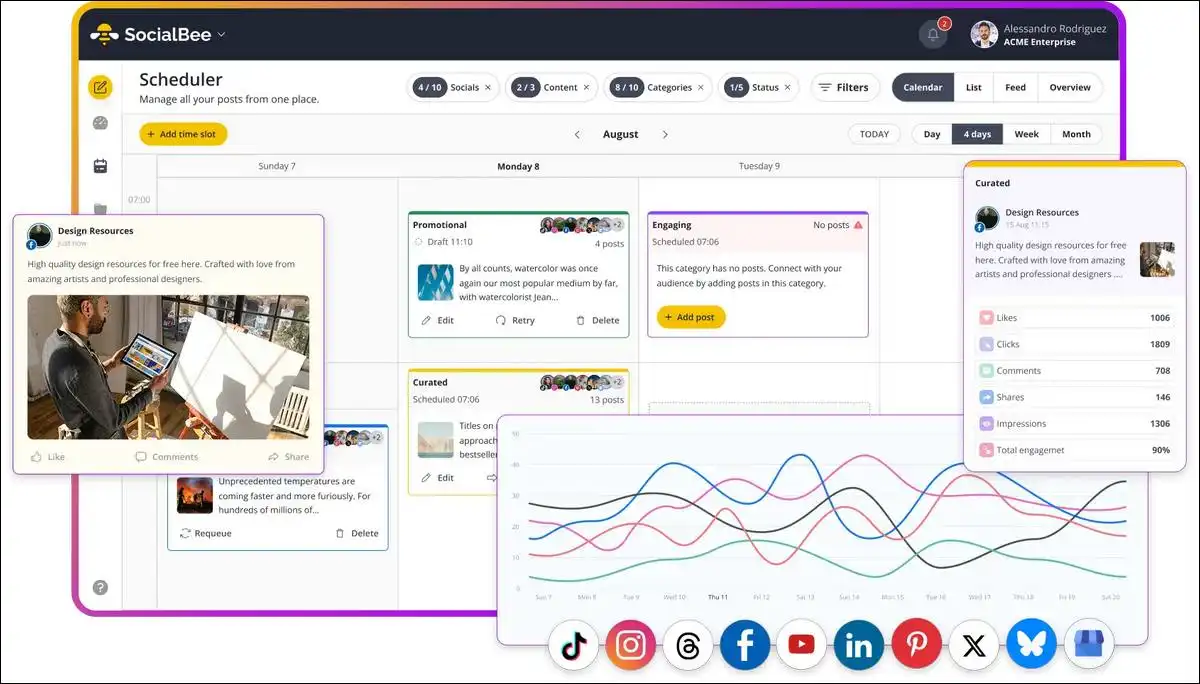
SocialBee focuses on category-based scheduling and evergreen recycling across all plans. You can connect up to 5 profiles on the $29 Bootstrap plan and up to 25 profiles on the $99 Pro plan.
Every plan includes unlimited AI for captions and images, plus analytics that go back 3 months on lower tiers or up to 2 years on higher ones.
Key details
- Flat pricing helps when your profile count stays steady.
- Category recycling lets you set rules once and let posts rotate automatically.
- Main limits show up when you need advanced social listening or custom reports on lower plans.
You can check the official site for the latest plan details.
Why Users Look For Alternatives?
You might consider switching when basic analytics no longer meet your reporting needs or when your team grows past 10 profiles. Some people want visual feed previews or approval workflows that feel lighter than SocialBee’s category setup.
Testing shows most users finish initial setup in 10 to 30 minutes, yet the real difference appears in daily effort and long-term costs.
Common reasons people explore other tools:
- Simpler queues without learning category rules.
- Stronger visual planning for Instagram or TikTok.
- Deeper analytics or social listening.
- Lower costs once profile or team size increases.
That said, it’s not about one tool being better overall. It’s about what fits your daily flow.
Latest Pricing Snapshot Of Popular Social Media Tools:
Here’s a simple overview of starting prices and main limits. On mobile devices, you can scroll the table sideways or read the bulleted pricing notes under each tool below.
| Tool | Starting Price | Profile/User Limit | Main Strength | Key Trade-off |
|---|---|---|---|---|
| SocialBee | $29 | 5 profiles | Category recycling + AI | Basic analytics on lower plans |
| Buffer | $6 per channel | Scales with channels | Simple queues | Costs rise with more channels |
| Hootsuite | $99 per user | 10 accounts | Listening tools | Higher price for small teams |
| Sprout Social | $199 per seat | Starts small | Analytics and inbox | Expensive as team grows |
| Later | $25 | 30 posts per profile | Visual grid planner | Weaker on recycling volume |
| Sendible | $29 | Creator plan | White-label reports | Interface feels older to some |
| Metricool | $18–22 | Starter plan | Competitor analysis | Free tier ends quickly |
| Publer | $10–17 | Professional plan | Bulk scheduling | Fewer team features |
| SocialPilot | $27+ | Professional plan | Multi-account templates | Steeper learning curve |
| Planable | $33+ | Basic plan | Approval workflows | Less recycling focus |
| MeetEdgar | $30 | 5 profiles | Evergreen + A/B testing | Tighter profile caps |
| RecurPost | $9 | Personal plan | Low-cost recycling | Lighter analytics |
| CoSchedule | $29 | Calendar plan | Marketing calendar | Extra project steps |
Mobile tip: If you’re reading this on your phone, scroll horizontally or jump to the tool sections for easier reading.
12 Strong SocialBee Alternatives in 2026
Each option below includes current pricing, a short hands-on note, an overall rating out of 5, and the main caveat. You can read the 100–150 word section for full context.
1. Buffer works best when you want fast setup and clear per-channel costs.
You’ll find you can pay about $6 per channel per month on the Essentials plan in 2026, with a free tier for up to 3 channels. The queue and calendar stay simple, so you can schedule posts in a few clicks without extra categories. In a test with 4 channels, Buffer let me load 15 posts and set timing rules in under 12 minutes. Analytics cover basic engagement but stop short of deep competitor data. Overall hands-on rating sits at 4.3 out of 5, with ease at 4.8 and value at 4.5.
Key points for Buffer:
- Pricing: You can start at about $6 per channel (annual billing often lowers it slightly).
- Hands-on note: Quick queue setup worked well for lighter posting volumes.
- Main caveat: Evergreen recycling stays manual, unlike SocialBee’s automatic categories.
- Best for: Creators who post fewer times per week and don’t like complex rules.
2. Hootsuite suits teams that need social listening alongside scheduling
You’ll find professional plan pricing starts near $99 per user per month for roughly 10 accounts. You can gain custom streams for brand monitoring and stronger inbox tools. A hands-on check with a 6-account setup showed reliable delivery and clear sentiment flags. The interface holds more options, so new users often spend extra time learning streams. Overall rating lands at 4.1 out of 5, with listening at 4.6 but value at 3.4.
Key points for Hootsuite:
- Pricing: You can start at $99 per user (Professional plan).
- Hands-on note: Listening module helped spot brand mentions faster than basic tools.
- Main caveat: Small teams often pay three times more than SocialBee for features used only part of the time.
- Best for: Groups that need real-time monitoring or compliance checks.
3. Sprout Social delivers the strongest analytics and team inbox for growing groups.
You’ll find you can start near $199 per seat per month on the Standard plan. The platform excels at customizable reports and competitor data that go beyond basic graphs. In testing a 5-seat setup, report exports cut weekly review time noticeably. You also receive solid approval workflows. Overall rating reaches 4.4 out of 5, led by analytics at 4.7.
Key points for Sprout Social:
- Pricing: You can start at $199 per seat (Standard plan).
- Hands-on note: Strong reporting helped teams that already track client results closely.
- Main caveat: A 3-person team can exceed $600 monthly before add-ons.
- Best for: Groups where detailed analytics directly support revenue or decisions.
4. Later fits creators who plan Instagram and TikTok feeds visually.
You’ll find starter pricing begins around $25 per month with limits such as 30 posts per profile in some reports. The drag-and-drop grid shows exactly how your feed will look. Testing with a lifestyle creator confirmed smooth scheduling plus useful AI captions for visual posts.
Also read: Best AI Tools for Social Media Captions That Give 31% Engagement Lift
You lose strong evergreen recycling and deeper support for LinkedIn or X. Overall rating sits at 4.2 out of 5, with visual planning at 4.6.
Key points for Later:
- Pricing: You can start around $25 (Starter plan).
- Hands-on note: Visual grid made feed planning faster for Instagram-heavy accounts.
- Main caveat: Recycling depth stays limited compared with SocialBee.
- Best for: Users whose main channels reward feed aesthetics over bulk evergreen volume.
5. Sendible supports agencies that need white-label reports and client portals.
You’ll find creator plan pricing starts near $29 per month. You can receive one-click branded reports and client dashboards. Hands-on work with a 3-client test showed reliable Canva sync and clean approval flows. The interface feels less modern than newer tools, so some users note extra clicks. Overall rating lands at 4.3 out of 5, with agency features at 4.5.
Key points for Sendible:
- Pricing: You can start near $29 (Creator plan).
- Hands-on note: White-label reports saved time on client updates.
- Main caveat: AI strategy tools lag behind SocialBee’s Copilot in depth.
- Best for: Agencies that bill clients and want polished outputs without building reports each month.
6. Metricool gives strong competitor analysis at a lower entry price.
You’ll find starter pricing runs about $18 to $22 per month. You can gain real-time dashboards and hashtag tracking that help benchmark against similar accounts. A test run comparing 2 competitor profiles showed clear weekly insights in the first dashboard view. Free tier options exist but cut off after basic use. Overall rating reaches 4.1 out of 5, driven by analytics value at 4.4.
Key points for Metricool:
- Pricing: You can start at $18–22 (Starter plan).
- Hands-on note: Competitor data helped users who track performance against others weekly.
- Main caveat: Evergreen tools stay lighter, so you handle rotation more manually.
- Best for: Users who want data first and accept simpler scheduling.
Also read: 22 Best Product Hunt Alternatives to Launch Your Startup
7. Publer keeps costs low while offering bulk scheduling and AI support.
You’ll find professional plans sit in the $10 to $17 range depending on exact tier. You can schedule in bulk and pull RSS feeds with fewer clicks. Testing a 5-profile setup showed reliable delivery and quick hashtag suggestions. Mobile features stay basic, and advanced approvals require higher tiers. Overall rating sits at 4.0 out of 5, with value at 4.5.
Key points for Publer:
- Pricing: You can start in the $10–17 range.
- Hands-on note: Bulk tools worked well for users who prepare content in batches.
- Main caveat: Fewer collaboration features than Planable or Sendible.
- Best for: Budget users who still want AI help without SocialBee’s category system.
8. SocialPilot targets teams that manage many accounts with template support.
You’ll find professional pricing begins around $27 per month. You can receive multi-account calendars and customizable post templates. A hands-on check with 8 profiles confirmed steady performance on bulk uploads. New users sometimes need extra time to learn the full template system. Overall rating lands at 4.0 out of 5, with multi-account strength at 4.3.
Key points for SocialPilot:
- Pricing: You can start around $27 (Professional plan).
- Hands-on note: Templates reduced repetitive work for multi-account users.
- Main caveat: Visual planning and deep listening stay weaker than dedicated tools.
- Best for: Teams already juggling many profiles who want templates to save time.
9. Planable excels for teams that require clear approval workflows.
You’ll find basic plan pricing starts near $33 per month. You can set up approval chains and marketing calendars that keep everyone aligned. Testing with a small agency group showed smooth comment threads and version history. Recycling volume stays lighter than SocialBee, so you rebuild queues more often. Overall rating reaches 4.2 out of 5, led by collaboration at 4.6.
Key points for Planable:
- Pricing: You can start near $33 (Basic plan).
- Hands-on note: Approval steps reduced email back-and-forth for teams.
- Main caveat: Higher cost for users who only need simple scheduling.
- Best for: Groups where approval mistakes carry real brand risk.

10. MeetEdgar remains closest to SocialBee’s recycling focus with added A/B testing.
You’ll find Eddie plan pricing starts near $30 for 5 profiles. You can gain automated evergreen rotation plus variation testing that picks stronger posts over time. Hands-on testing with a 4-profile library showed reliable rotation and clear performance lifts after two weeks. Profile caps stay tighter on lower plans. Overall rating sits at 4.1 out of 5, with recycling at 4.5.
Key points for MeetEdgar:
- Pricing: You can start near $30 (Eddie plan).
- Hands-on note: A/B testing gave measurable lifts on evergreen content.
- Main caveat: Analytics and team features stay lighter than Sprout or Hootsuite.
- Best for: Users who like SocialBee’s hands-off posting but want extra testing.
11. RecurPost offers one of the lowest-cost paths to evergreen recycling.
You’ll find personal plan pricing begins around $9 per month. You can import libraries and set RSS feeds that keep content flowing with minimal daily input. A migration-style test from a SocialBee export showed fast CSV handling. Analytics and advanced AI stay lighter than on SocialBee or Metricool. Overall rating reaches 3.9 out of 5, with value at 4.6.
Key points for RecurPost:
- Pricing: You can start around $9 (Personal plan).
- Hands-on note: Low cost and easy imports helped budget-conscious users.
- Main caveat: Reporting stays lighter, so you may pair it with another tool for client updates.
- Best for: Tight budgets that still need automatic posting volume.
12. CoSchedule combines scheduling with a broader marketing calendar.
You’ll find calendar plan pricing starts near $29 per month. You can link social posts to tasks and content projects in one view. Testing showed helpful ReQueue recycling that fills gaps with top performers, though it requires more initial setup. Overall rating lands at 4.0 out of 5, with calendar integration at 4.4.
Key points for CoSchedule:
- Pricing: You can start near $29 (Calendar plan).
- Hands-on note: Calendar view helped teams that track blogs and emails alongside social.
- Main caveat: Extra project tools add steps if you only need social scheduling.
- Best for: Marketing teams that already work with broader content calendars.
Feature Comparison at a Glance
This table highlights where each tool pulls ahead or falls short of SocialBee. On mobile, scroll sideways or check the bulleted points under each tool for easier reading.
| Feature | SocialBee | Buffer | Hootsuite | Sprout Social | Later | MeetEdgar |
|---|---|---|---|---|---|---|
| Flat monthly pricing | Yes | No | No | No | Yes | Yes |
| Strong evergreen recycling | Yes | Manual | Basic | Basic | Limited | Yes + A/B |
| Visual feed planner | Limited | No | No | No | Yes | No |
| Social listening | No | No | Yes | Yes | No | No |
| White-label reports | Higher tiers | No | Limited | Yes | No | No |
| Team approvals | Pro and up | Team plan | Yes | Yes | No | Limited |
Mobile tip: The table works best on desktop. But if you’re on your phone, the key points listed under each tool name above should make things easier.
Migration Guide: Moving from SocialBee
You can complete most migrations from SocialBee in one to two weeks when you prepare your content first. You can start by exporting your categories and top posts as CSV files from SocialBee.
Most alternatives accept CSV imports or let you paste posts in bulk.
Simple migration steps:
- Export categories and posts from SocialBee as CSV.
- Import or paste content into the new tool and rebuild main queues.
- Test a small batch of 10–15 posts for two or three days.
- Run both tools in parallel for the first week to catch any timing issues.
- Watch for API limits or format differences during the handoff.
Moreover, common pitfalls include losing old analytics history and underestimating time to recreate approval rules. Most users report smoother transitions after the parallel week ends.
How to Choose the Right Tool for Your Situation
You’ll want to match the option to your profile count and top priorities rather than comparing every feature at once. If you run 5 or fewer profiles and value automatic recycling, start with Buffer, MeetEdgar, or RecurPost. You’ll keep costs predictable and maintain steady output.
Quick decision guide:
- Simple setup and lower volume: Buffer or Publer often fit well.
- Visual Instagram or TikTok focus: Later usually delivers faster results.
- Client work and polished reports: Sendible or Planable help most.
- Team approvals and collaboration: Planable or Sprout Social reward the extra steps.
- Enterprise listening or compliance: Hootsuite or Sprout Social justify the higher cost.
Running the free trial or low-cost starter plan for at least 10 days with your real content often gives the clearest picture. That way you see how it actually feels in your workflow.
Pricing Reality Check for 2026
Flat pricing on SocialBee helps when your profile count stays steady. Per-channel or per-seat models on Buffer, Hootsuite, and Sprout Social can surprise you once you add accounts or teammates. A 10-profile setup on Buffer’s Essentials plan often lands near $60 monthly on annual billing, while SocialBee’s Accelerate plan stays at $49 for 10 profiles.
You can calculate your true monthly number with your exact profile count and any add-ons you expect to use. Most tools offer annual discounts between 10 and 20 percent, so factor that in before you commit. Free tiers exist on Buffer, Metricool, and a few others, but they usually limit posts or analytics enough that active users upgrade within the first month.
End Note
SocialBee remains a sensible choice for users who like its recycling system and bundled AI at a predictable price. Many of the alternatives above pull ahead only when your needs shift toward simpler queues, stronger visual tools, or enterprise-grade reporting. You’ll reduce risk by testing two shortlisted options side by side with your actual posts and team feedback.
Take the migration steps at a comfortable pace and watch costs as you scale. The right fit usually shows up in lower daily effort and clearer results rather than in any single headline feature. Start with your profile count and top three priorities, then narrow the list from there.