Google is bringing a Circle to Search-style feature to Chrome’s Ask Gemini
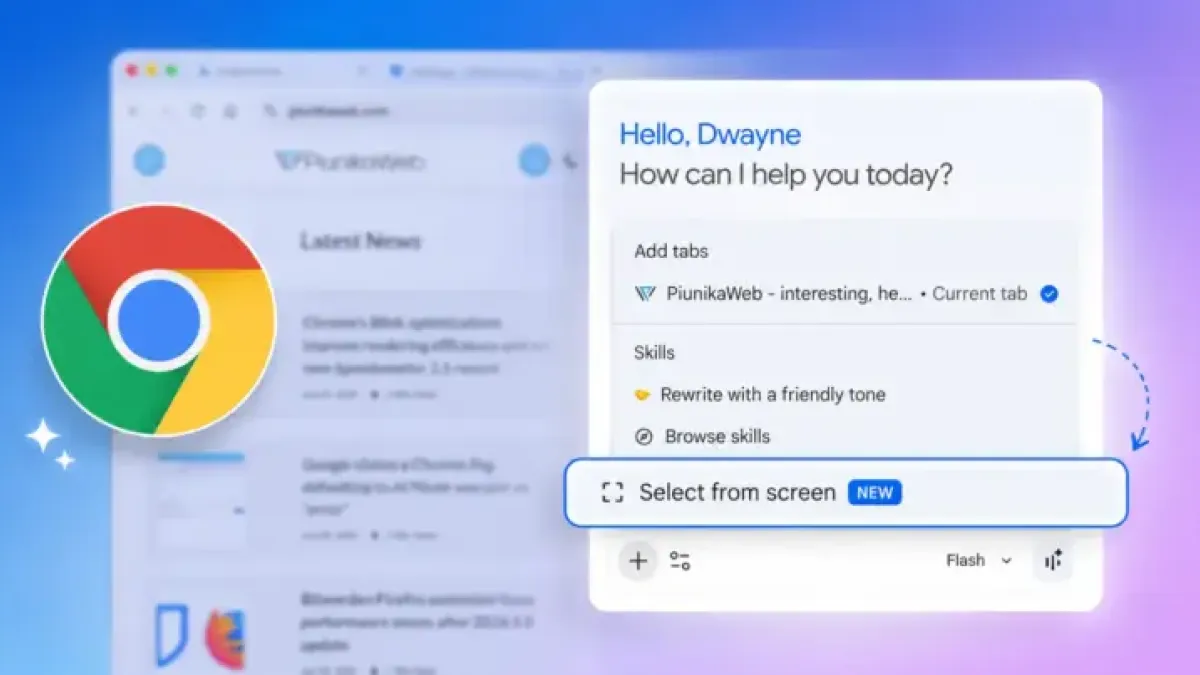
Google is adding a screen-selection feature to Chrome’s Ask Gemini side panel, letting users highlight one or more regions of their screen and send them directly to the AI assistant without leaving the browser.
The feature was spotted by researcher Leopeva64 and is currently live in Chrome Canary, the early-access build Google uses to test experimental features. Users can select multiple screen regions and attach them as a group to a single Gemini query, rather than being limited to one screenshot per question.
The capability has been in development since at least March, when Leopeva64 noted that Google had added a setting to customize the keyboard shortcut for the selection overlay. The full interface has only recently surfaced in Canary builds.
The addition addresses a meaningful gap in Gemini’s Chrome integration. Previously, users who wanted to ask Gemini about an image or a specific section of a page had to open the standalone Gemini website, upload the file there, and continue the conversation separately. That detour interrupted workflows for anyone relying on the side panel as a research or productivity tool.
The selection tool is accessible through the “Add attachments” menu and the “Select from screen” option inside the Gemini side panel. A dedicated keyboard shortcut setting exists in the code but has not yet appeared consistently across all Canary installs.
The move mirrors Circle to Search, the Android feature that lets users draw around on-screen content to trigger a Google Search. Bringing similar behavior to desktop Chrome aligns with a broader push Google appears to be making to deepen Gemini’s usefulness inside the browser, alongside other recent additions such as automatic credit card selection and a floating AI-powered address bar.
No release date for the stable channel has been announced.