
What is Personal vDisks? Full Details

Personal vDisks, also know as PvD, is developed Citrix technology for virtual desktop environments. It enables organizations to combine the simplicity of shared desktop images with the flexibility of personal desktops.
In simple terms, it allows each user to have a personalized experience while IT retains centralized control over the system.
In this guide, learn how Personal vDisks work, what data they store, key benefits, limitations, and when they are the right choice for VDI environments.
Understanding the Core Idea of Personal vDisks
To understand Personal vDisks clearly, we need to start with a common challenge in virtual desktop infrastructure. Shared desktops are easy to manage and update.
However, they limit personalization. Fully persistent desktops allow customization, but they significantly increase management effort.
Personal vDisks were designed to bridge this gap. We get centralized image management, and you get personal settings and applications that persist across sessions. This balance is what makes PvD distinct.
Each user receives a dedicated virtual disk. This disk stores personal changes. Meanwhile, the core operating system remains shared and protected.
How Personal vDisks Actually Work
When you sign in to a virtual desktop that uses Personal vDisks, two layers come into play. The first is the master image. Administrators maintain this image. It contains the base operating system and standard applications.
The second layer is your Personal vDisk. This disk records the changes you make. These changes include installed applications, configuration updates, and registry modifications. During runtime, both layers merge seamlessly.
From your perspective, the desktop behaves like a traditional PC. From an admin perspective, control and consistency remain intact.

Architecture and Key Components of PvD
Personal vDisks rely on a layered architecture. Each layer serves a defined role. Understanding these components helps us manage and troubleshoot environments more effectively.
Below is a simplified overview of the key elements involved.
| Component | Purpose |
|---|---|
| Master Image | Read-only base operating system and apps |
| Personal vDisk | Stores user-installed apps and settings |
| Write Cache | Captures temporary session changes |
| Citrix Controller | Manages desktops and policies |
This architecture ensures stability. It also allows administrators to update the base image without affecting user data.
What Data Is Stored in a Personal vDisk
A Personal vDisk is not just generic storage. It is structured to capture specific types of user-level changes. This design keeps the system efficient and predictable.
Typically, Personal vDisks store applications installed by the user after deployment. They also store registry changes and configuration updates. Depending on the setup, some user data may be redirected elsewhere.
System-level files remain protected, so users cannot alter the core OS. As a result, personalization does not compromise system integrity.
Benefits of Using Personal vDisks in Enterprises
Personal vDisks provide several advantages in enterprise environments. One major benefit is reduced image sprawl. We can maintain fewer master images while supporting varied user needs.
Users gain flexibility, and they can install approved tools without submitting repeated IT requests. At the same time, IT teams maintain control over updates and security.
Troubleshooting also becomes easier. Since the base image stays clean, issues can often be resolved at the image level rather than per user.
Also read: LPWAN Explained: Meaning, How It Works, Real IoT Examples
Limitations and Challenges You Should Know
Despite their advantages, Personal vDisks are not without limitations. Storage requirements are higher because each user needs a dedicated disk. In large environments, this can increase infrastructure costs.
Image updates may take longer. Changes must be carefully merged with user disks. Without proper testing, conflicts can occur.
PvD is also less suitable for highly dynamic workloads. Power users or developers may exceed its design limits.
Personal vDisks vs Other User Personalization Methods
To choose the right solution, it helps to compare Personal vDisks with other personalization approaches.
| Method | Persistence Level | Management Effort |
|---|---|---|
| Roaming Profiles | Low | Medium |
| Folder Redirection | Data only | Low |
| Full Persistent VDI | Full | High |
| Personal vDisks | Apps and settings | Medium |
Personal vDisks occupy the middle ground. They offer more flexibility than profiles, without the overhead of full persistent desktops.
Common Use Cases Where PvD Makes Sense
Personal vDisks are well-suited for environments where users need limited but reliable customization. Task workers and knowledge workers often fall into this category.
Call centers, finance teams, and support staff benefit from consistent desktops with room for personal tools. These roles depend on stability and repeatability.
Educational labs also use PvD. Students can retain settings and applications while administrators manage a single base image.
Deployment and Management Considerations
Successful PvD deployment starts with careful planning. Storage sizing is critical. You must allocate enough space per user while avoiding unnecessary waste.
Image lifecycle management also matters. We should test updates thoroughly before rollout. This prevents compatibility issues with user-installed applications.
Monitoring tools play an important role. They help track disk usage, performance trends, and potential bottlenecks over time.
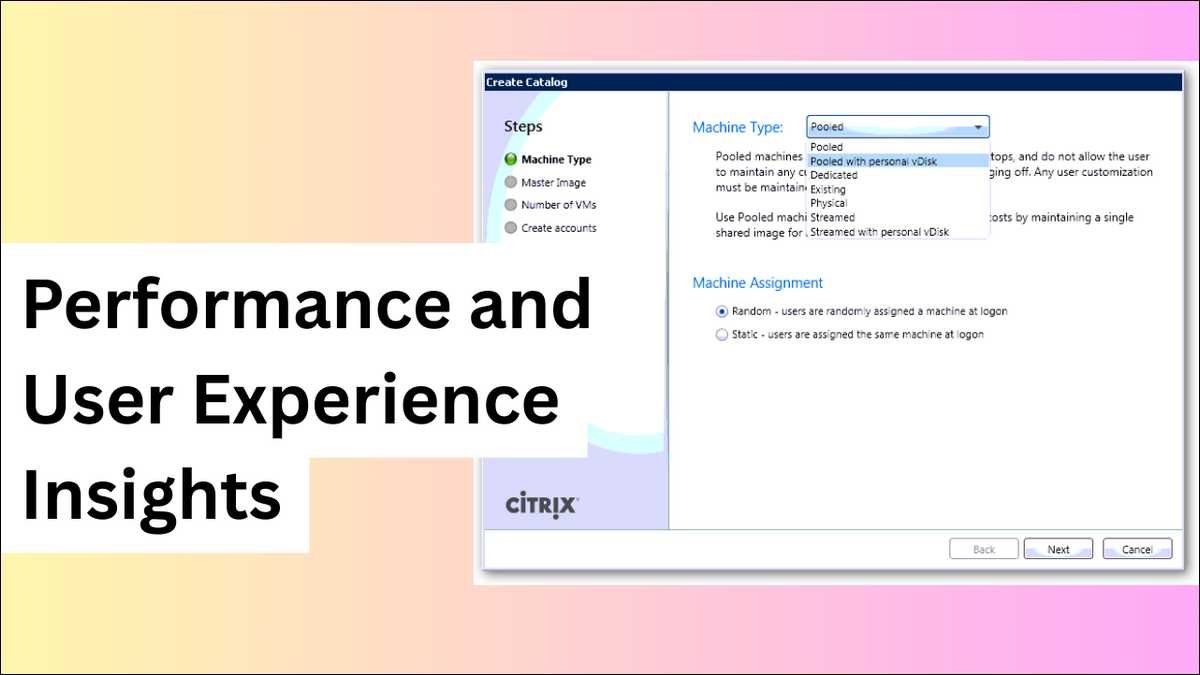
Performance and User Experience Insights
From a user standpoint, Personal vDisks feel similar to physical desktops. Login times may be slightly longer, but the trade-off is persistent customization.
Application performance is generally consistent. Core apps run from the optimized base image. Personal apps load from the user disk.
With proper storage design and IOPS planning, performance issues remain minimal.
Security and Compliance Perspective
Security remains a strong advantage of Personal vDisks. Administrators control the operating system and core patches. Users cannot modify protected system areas.
This separation reduces risk. Even if a personal application causes issues, the master image remains unaffected. For regulated industries, this model supports compliance requirements.
Auditing is also simpler. We know where user changes are stored and how they are isolated.
Current Status and Evolution of Personal vDisks
Over time, Citrix has shifted away from Personal vDisks in favor of newer technologies. Solutions like Citrix App Layering and advanced user environment management tools now address similar needs.
However, many organizations still operate PvD-based environments. Understanding Personal vDisks remains important for supporting legacy systems and planning migrations.
For deeper technical insight, Citrix product documentation and established VDI architecture guides remain reliable reference points.
![How to Recover Deleted Files from the Recycle Bin on Windows 11? [Free Methods]](https://www.techdemis.com/wp-content/uploads/2026/06/How-to-Recover-Deleted-Files-from-the-Recycle-Bin-on-Windows-11-800x450.webp)

![Restart Bluetooth Service In Windows 11 & 10 [Full Guide]](https://www.techdemis.com/wp-content/uploads/2026/06/Restart-Bluetooth-Service-In-Windows-11-and-10-800x450.webp)

