Helium Browser Update Brings Desktop Extensions and Developer Tools to Android
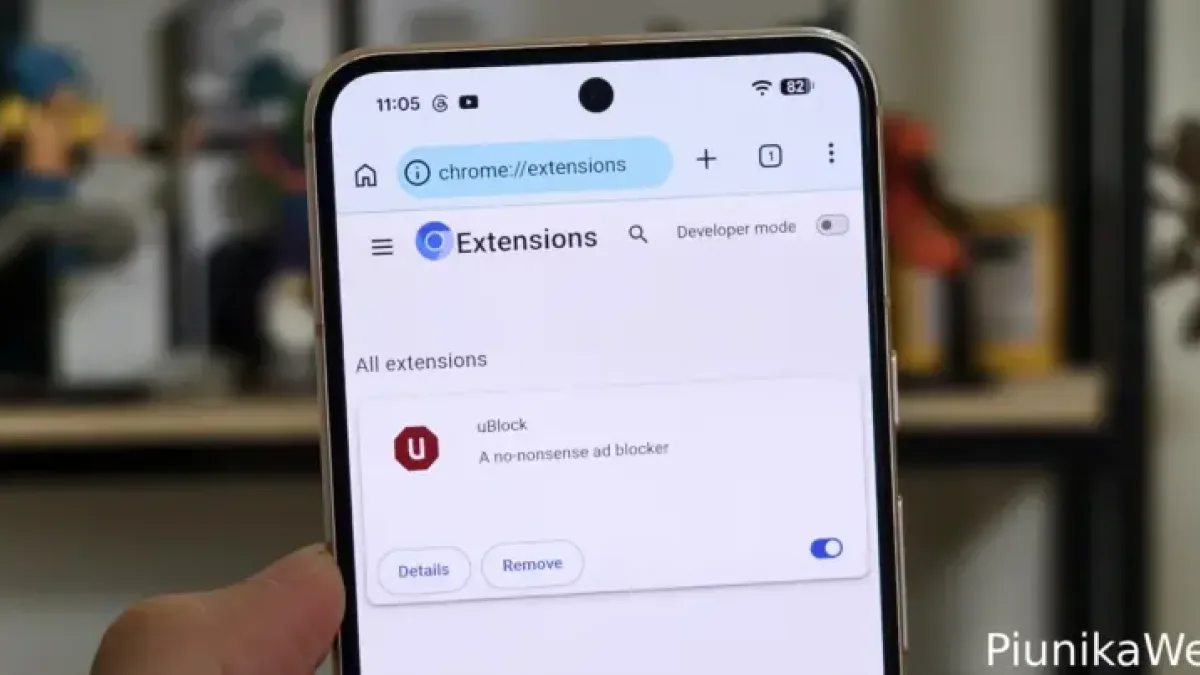
An independent developer has released a significant update to Helium, a Chromium-based Android browser, adding full support for Manifest V2 extensions — the standard that powers most desktop Chrome add-ons — along with a native developer tools interface.
Version 149.0.7827.48 lets users install extensions directly from the Chrome Web Store and interact with them through pinned toolbar popups, a capability no mainstream Android browser currently offers.
Why This Matters
Google strips extension support from mobile Chrome to shield its search and advertising revenue. Independent projects must manually patch the functionality back into Chromium’s open-Source Code to restore it.
Android power users have long relied on Kiwi Browser as the go-to option for mobile extensions. Development on Kiwi has slowed sharply and appears largely abandoned, leaving a gap that Helium is now filling.
Users in the r/browsers subreddit on Reddit have begun framing Helium as Kiwi’s direct successor.
What Version 149 Adds
The update resolves two bugs that GitHub testers flagged in earlier builds. A tester identified as prasetyodedy reported that previous versions blocked users from unpinning extensions and interacting with them directly. A separate fault caused the browser’s built-in web translator to stall in a loading loop.
Developer jqssun pushed the v149 update less than two days after users filed those reports on GitHub.
The release also adds custom search engine support, letting users define their own providers rather than choosing from a fixed list. DuckDuckGo ships as the default.
How to Install Extensions
Installing extensions requires a workaround. Users must enable “Desktop site” mode before visiting the Chrome Web Store — Google’s mobile block otherwise prevents installation. Once desktop mode is active, extensions install in the background through the standard Chrome Web Store flow.
Helium’s developer tools frontend gives mobile users access to a full browser inspection interface — a feature typically reserved for desktop environments and used by web developers to debug code, inspect page elements, and monitor network traffic.
Build Notes
Users testing the initial v149 release flagged a minor bug in build 1780064917. The subsequent build, 1780100976, addresses the issue.
The latest version is available on the project’s GitHub repository.
Chromium, the open-source browser engine that underpins Chrome, also forms the base for Microsoft Edge, Opera, and Brave, among others.