Opera Neon Releases CLI Tool Letting AI Coding Agents Control the Browser Directly
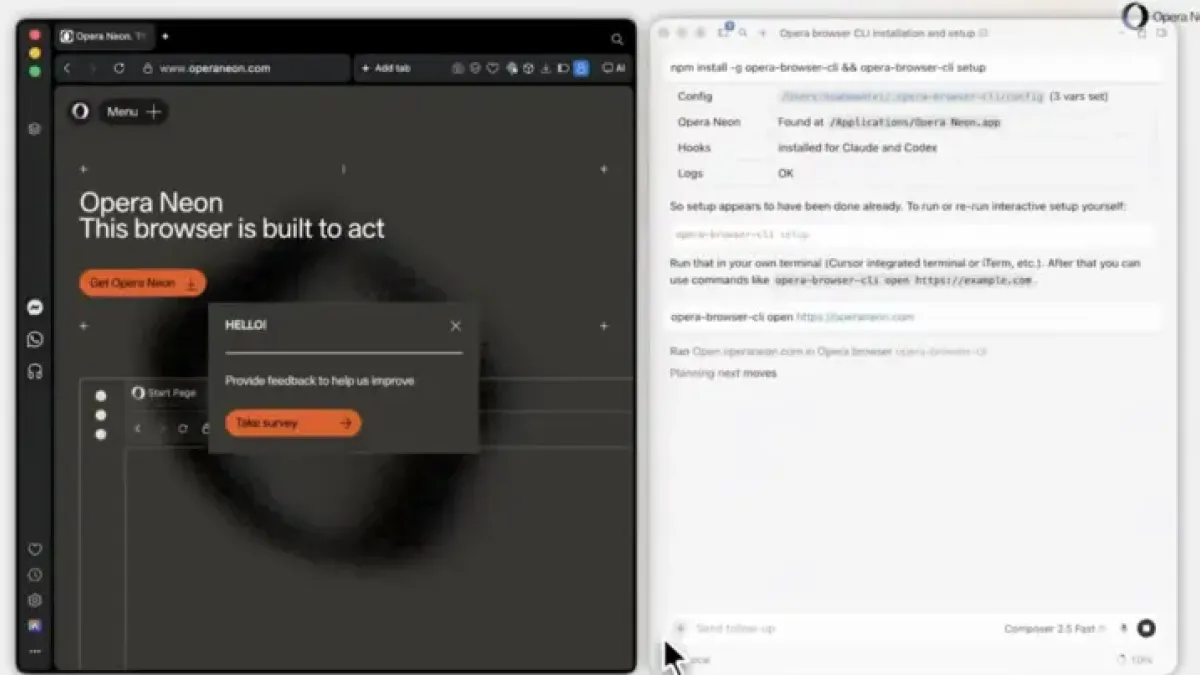
Opera Neon has published a video guide showing developers how to give two widely used AI coding tools — Cursor and Codex — direct control over its browser, eliminating the need to manually switch between a code editor and a browser window.
The company posted the walkthrough on X on June 17, demonstrating a command-line tool called Opera Browser CLI that acts as a bridge between an AI coding agent and the browser itself.
What the Tool Does
Opera Browser CLI lets AI agents open web pages, click buttons, fill forms, and execute other browser tasks without extra extensions or separate sign-ins.
It runs locally on the developer’s machine, meaning no cloud relay sits between the coding environment and the browser.
Cursor and Codex are AI-assisted coding tools that help developers write and manage code faster. Developers routinely need to check sites, test features, or retrieve web data mid-build — tasks the AI can now handle autonomously through the CLI.
Setup Steps
The setup requires Node.js version 20 or newer, plus an installed and logged-in copy of Opera Neon.
From a terminal, developers run one combined command: `npm install -g opera-browser-cli && opera-browser-cli setup`. The setup step detects the existing Opera installation and completes configuration automatically.
To test the connection, developers run `opera-browser-cli open` followed by any web address — for example, `https://www.operaneon.com/` — and the browser opens that page directly from the terminal or coding environment.
Once connected, commands stay simple. A developer types a request, or lets the AI agent issue it, and the browser responds immediately.
Opera Neon has not disclosed how many developers currently use the browser, nor has it published adoption figures for the CLI tool since the June 17 post.