Hamraaz Web Portal: Login, Payslip, Pay Calculator, Security [Complete Guide In 2026]
![Hamraaz Web Portal: Login, Payslip, Pay Calculator, Security [Complete Guide In 2026]](https://www.techdemis.com/wp-content/uploads/2026/05/Hamraaz-Web-Portal-Explained.webp)
Hamraaz Web is the only official digital portal for Indian Army personnel — and knowing how to use it well makes a real difference to your daily service life.
It was built by the technical team of the Adjutant General’s (AG) Branch, MP-8 — the division that handles all Army personnel administration.
Before this portal existed, soldiers physically visited pay offices just to get a salary slip. That meant paperwork, queues, and days of waiting for something that should take seconds.
Today, Hamraaz Web is a mission-critical platform tailored for the unique needs of Indian Army soldiers. Everything from payslips to tax documents to service records now lives in one secure place.
The scale of those who depend on this portal is worth pausing on. According to the Indian Defence Institute, as of 2026, the Indian Army has approximately 1.248 million active personnel — every one of them a potential Hamraaz Web user. That makes this one of India’s most consequential government platforms, full stop.
Also read: Get SIM Owner Details

The Death of the Hamraaz App — What Changed in 2023
Here’s the thing every soldier needs to know upfront: the Hamraaz mobile app is permanently gone. Do not try to download it anywhere.
As of March 31, 2023, the Hamraaz App was officially discontinued. The Indian Army advised personnel to refrain from downloading or using the app from any platform, including the Google Play Store, third-party websites, or malicious sources.
So the web portal now handles every function the app previously provided — no exceptions.
That distinction matters more than it might seem. Any app claiming to be Hamraaz — on the Play Store or elsewhere — is a fake and should not be trusted.
Why? Because fake apps are actively being used to target soldiers. In early 2022, threat actors targeted Indian Army soldiers by creating fake, malicious versions of the Hamraaz app. These clones replicated the icon, name, and source code, then injected a Trojan capable of reading SMS, live location data, and contacts.
Fake apps still circulate in 2026. Because of that, the official web portal is your only safe option — and the sections below show you exactly how to use it.
The Only Legitimate Hamraaz Web URLs (Verified 2026)
Before anything else, get the URL right. Using the wrong one is the single most dangerous mistake a soldier can make on this portal.
| URL | Status | Purpose |
|---|---|---|
hamraazmp8.gov.in | ✅ Official | Main portal homepage |
web.hamraazmp8.gov.in | ✅ Official | Direct personal login page |
hamraazmp8.co.in | ❌ Unofficial | Not authorized — avoid |
hamraazwebportal.com | ❌ Unofficial | Not authorized — avoid |
thehamraazweb.com | ❌ Unofficial | Not authorized — avoid |
hamraazweb.in or similar | ❌ Unofficial | Not authorized — avoid |
The only valid and trusted site is https://hamraazmp8.gov.in. Personnel should avoid any site ending with .com, .in, or similar variations — they are not authorised.
The .gov.in domain suffix is your one definitive authenticity marker. Always check the browser address bar before entering your PAN or password. Better still — bookmark the official URL right now to avoid accidentally landing on a phishing page later.
Who Can Use Hamraaz Web — Eligibility Rules
Access to Hamraaz Web is restricted entirely to active Indian Army personnel. Retired personnel, civilians, and their families are not able to sign up or use the website.
Serving soldiers (Jawans) and commissioned officers up to a specified rank are eligible. That said, before you even attempt registration, make sure you have all three of the following ready:
- PAN Card — your primary login ID (entered in CAPITAL LETTERS)
- Date of Enrollment (DOE) — the exact date you joined the Indian Army
- Employment ID (EMP ID) — found on your old paper pay slip
Without all three, registration simply cannot be completed. So locate your EMP ID first — it’s the one most soldiers don’t have at hand when they sit down to register.
How to Register on Hamraaz Web — First-Time Signup Guide
New users must register before accessing any Hamraaz service. The good news is, it’s quicker than most government portals.
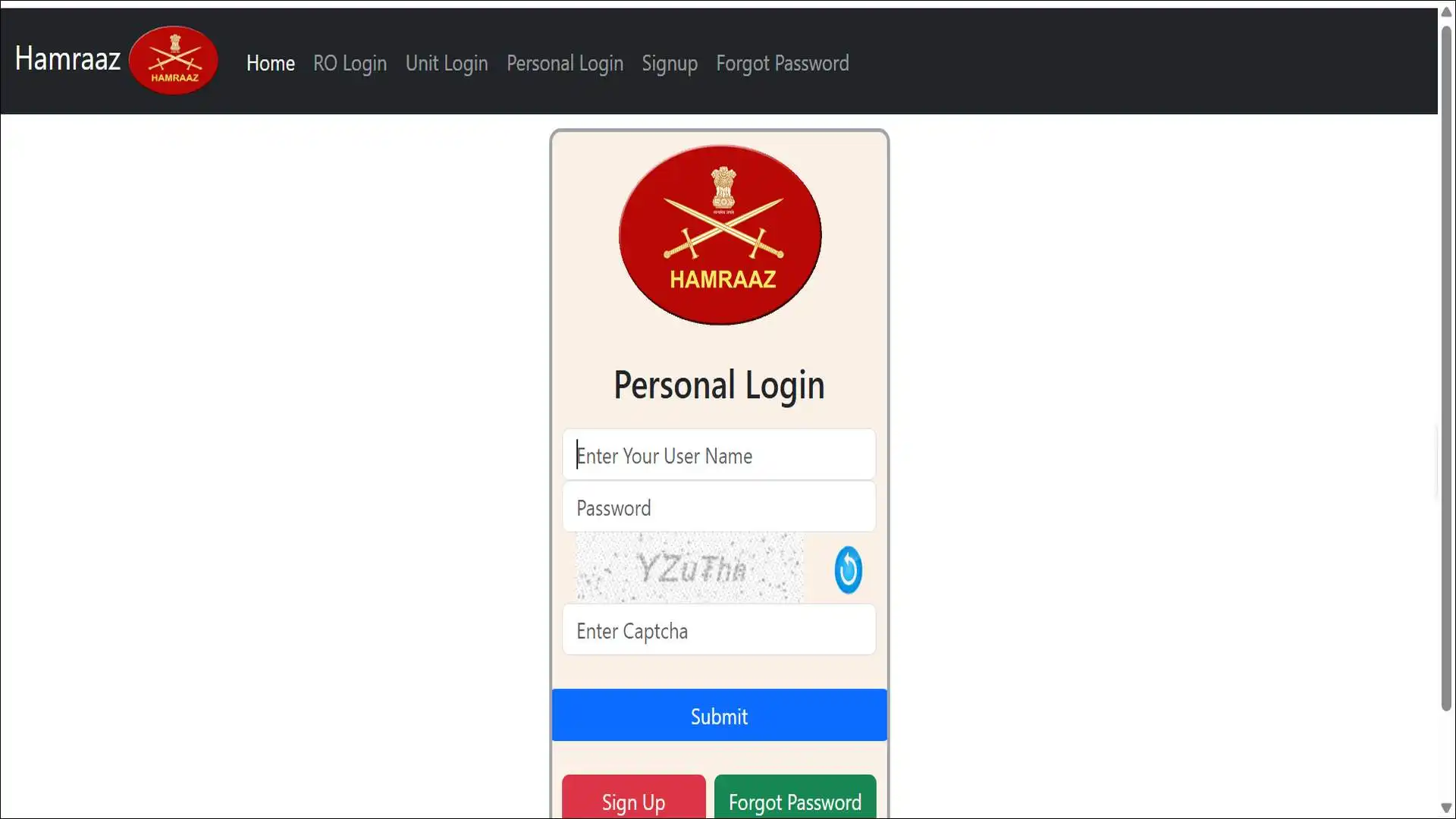
To register: visit https://hamraazmp8.gov.in and click on the “Signup” option. Enter your PAN in capital letters (English only) and fill in the captcha code, then submit. Two options appear: Email ID (OTP) or Try Another Way.
On the next page, enter your Date of Enrollment (DOE) in DD/MM/YYYY format. Then provide your Employment ID (EMP ID), which can be found on your old Pay Slip.
Still, things do go wrong — especially for first-time users. Here’s what to do when they do:
Common Registration Errors and Fixes
| Error | Cause | Fix |
|---|---|---|
| PAN not accepted | Lowercase letters entered | Re-enter PAN in ALL CAPS only |
| OTP not received | Wrong mobile number registered | Use “Try Another Way” option |
| DOE rejected | Wrong date format | Use DD/MM/YYYY strictly |
| EMP ID not found | Old pay slip unavailable | Contact your unit records section |
| Captcha failure | Browser compatibility issue | Switch to Chrome or Firefox |
Once all documents are ready, registration takes only a few minutes. After successful registration, your credentials activate immediately — no waiting period.
Hamraaz Personal Login — Step-by-Step for 2026
With registration done, logging in is straightforward. The whole process takes under 60 seconds if you follow the right steps.
Open any web browser and go to web.hamraazmp8.gov.in. Find the “Personal Login” section on the main page. Your login user ID is your PAN card number. Enter your password and captcha to proceed.
Forgot Your Password? Reset It in 3 Steps
Forgetting a password is common — and the portal handles it cleanly. Visit the official portal, click the “Forgot Password” option in the menu bar, enter your PAN card details and captcha, then click submit.
You can then reset your password using a security question or by mobile/email OTP.
Login Troubleshooting Table
Even with the right steps, some users still hit errors. Here’s what each one usually means:
| Problem | Most Likely Cause | Solution |
|---|---|---|
| “Invalid credentials” error | PAN entered in lowercase | Re-enter PAN in CAPITALS |
| Account temporarily locked | Multiple failed attempts | Wait 30 mins, then retry |
| Page won’t load | Server maintenance (late night) | Try again after midnight maintenance |
| OTP not arriving | Outdated mobile number on record | Contact commanding officer |
| Captcha keeps refreshing | Slow internet connection | Switch to faster Wi-Fi or mobile data |
As per research, we found that multiple failed login attempts may temporarily lock your account. Double-check both fields for typos, ensure Caps Lock is off, and verify you are using the correct service number format.
Every Feature Inside Hamraaz Web — Fully Decoded
Most soldiers only use Hamraaz to download their payslip. In reality, the portal offers 13+ services — and most of them go untouched.
The portal’s features include payslip and Form-16 download, leave encashment, Part II order details, grievance redressal, pay calculator, AFPP fund management, and fund withdrawal status tracking.
Let’s go through each one properly.
Payslip Download — Reading Every Line Item
Your monthly payslip contains far more information than just your take-home amount. Most soldiers scan the final “Amount Credited to Bank” figure and close the file — but understanding every line helps you catch errors before they compound.
A Hamraaz payslip contains all pay components: BAND PAY, GRADE PAY, GP-X PAY, MS PAY, CL PAY, TPAL, DA, PMHA, LRA, RECURRING ALLOWANCES, and Arrears. Deductions listed include AFPP FUND SUBSCRIPTION, AFPP FUND REFUND, AGIF, PLI, LOANS & ADVANCES, FAMO, E-TICKETING, INCOME TAX, and AMOUNT CREDITED TO BANK.
Here’s what each code actually means:
Payslip Component Glossary:
| Code | Full Name | What It Means |
|---|---|---|
| BAND PAY | Basic Band Pay | Your base salary per 7th Pay Commission |
| DA | Dearness Allowance | Inflation compensation (60% of basic as of Jan 2026) |
| TPAL | Transport Allowance | Daily commute compensation |
| PMHA | Post/Area Allowance | Location-based posting supplement |
| AFPP | Armed Forces Personnel Provident Fund | Your mandatory provident fund contribution |
| AGIF | Army Group Insurance Fund | Group life insurance deduction |
| PLI | Postal Life Insurance | Optional insurance premium deduction |
| FAMO | Family Accommodation | Government quarters-related deduction |
On timing: payslips are typically updated by the first week of each month. So if yours hasn’t appeared, check back on the 7th before raising a grievance.
Also read: Tropic Trooper’s New Arsenal: AdaptixC2 & GitHub C2 Explained
Form-16 Download and ITR Filing for Soldiers
Form-16 is your official income tax document — and Hamraaz is where you get it. Soldiers can download annual Form-16 income tax statements as PDFs directly from the portal. This replaces paper documents and eliminates the need to visit a pay office.
How to download Form-16:
- Log in at
hamraazmp8.gov.in - Navigate to Payslip/Form-16 from the dashboard menu
- Select the relevant financial year (e.g., 2025–26)
- Click Download PDF
- Save the file immediately to a secure folder
What most soldiers miss is this: your Hamraaz Form-16 is pre-filled with all allowances, deductions, and TDS amounts. You can submit it directly to a tax consultant or upload it to the Income Tax portal for ITR-1 filing without any manual calculation. On top of that, Form-16 from Hamraaz is accepted by all banks for home loan applications too.
Also read: How to download Form 26AS for ITR Filing
Pay Calculator — Find Your Best MACP or Promotion Pay
The Pay Calculator is one of the most financially important tools on the portal — and one of the least used. The Hamraaz Pay Calculator is built for Army personnel. It helps check Basic Pay, compare increment options, and understand salary after promotion or MACP.
It uses the official pay matrix and rules from the 7th Pay Commission.
How to use the Pay Calculator:
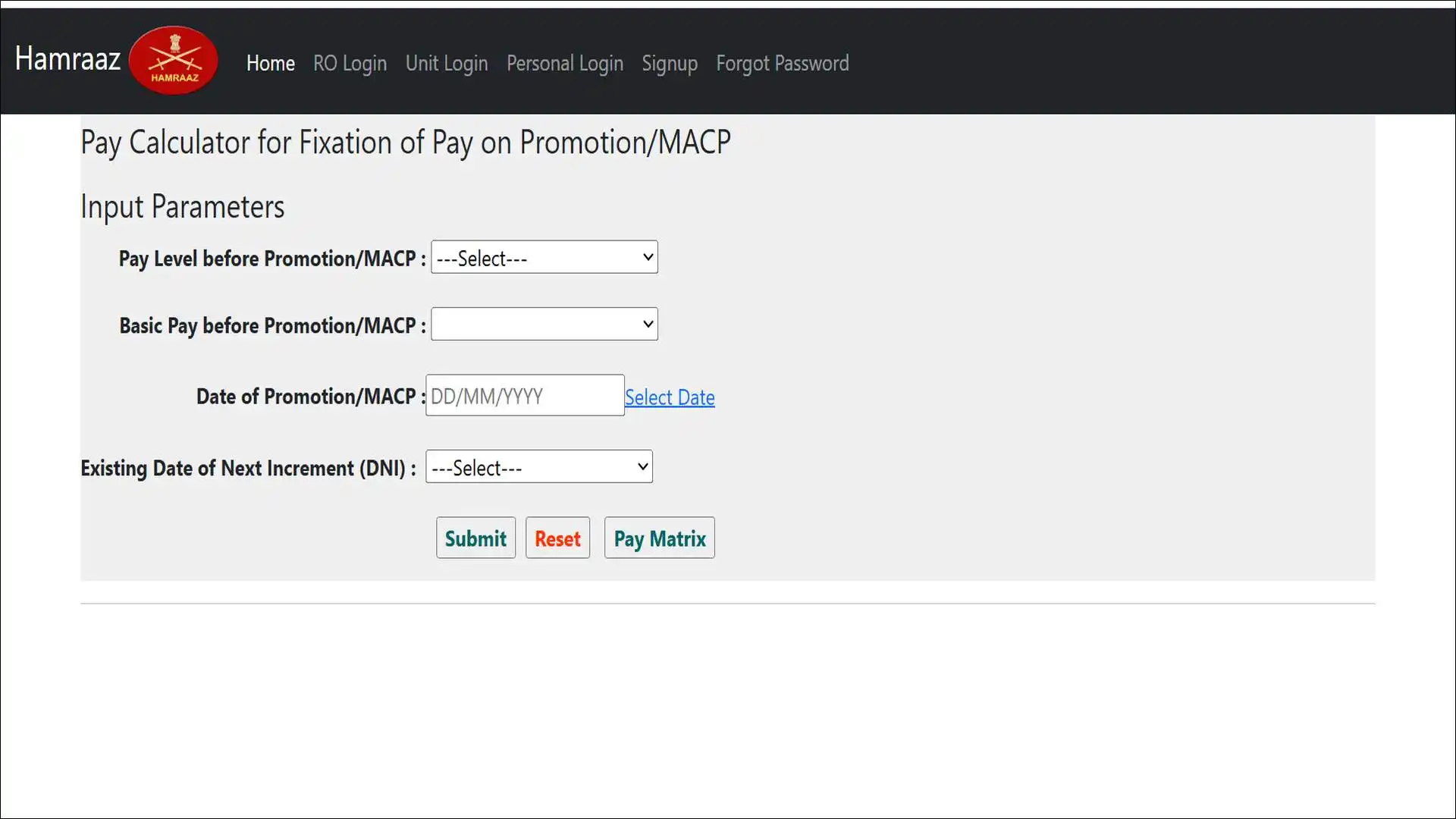
Visit the official portal, click on the “Pay Calculator” option, then input: Pay Level before Promotion/MACP, Basic Pay before Promotion/MACP, Date of Promotion/MACP, and Existing Date of Next Increment (DNI). Submit to get your best pay fixation option.
The 1st January vs 1st July Increment Decision:
This is where real money is at stake. Both increment dates are valid. The calculator helps compare which option gives better financial benefit after your promotion or MACP. If your calculated pay is higher than your current pay, talk to your records office or submit the Option Certificate for pay correction.
Many JCOs lose thousands of rupees annually simply by not running this comparison. The difference between the January and July increment options can be ₹500–₹2,000 per month, depending on your pay level. So before submitting your option certificate after any promotion, run the calculator first — it takes two minutes.
AFPP Fund vs DSOP Fund — The Difference Explained
These are two separate provident funds, and most soldiers treat them as the same thing. They’re not.
DSOP stands for Defence Services Officers Provident Fund. Soldiers can check how much has been contributed to their funds, how much has been deducted, and their current balance by logging into the Hamraaz portal with their personal credentials.
Here’s how the two funds differ:
| Feature | AFPP Fund | DSOP Fund |
|---|---|---|
| Full Name | Armed Forces Personnel Provident Fund | Defence Services Officers Provident Fund |
| Eligible for | JCOs and Other Ranks (OR) | Commissioned Officers |
| Tax on withdrawal | No tax at time of withdrawal | Tax-exempt under Section 10 |
| Management | Through the Hamraaz Web portal | Through Hamraaz Web portal |
| Change subscription | Yes, online via Hamraaz | Yes, online via Hamraaz |
Better still, you don’t need to visit your unit office to change your contribution. Soldiers can update or modify their Army Group Insurance Fund contributions directly through the portal, skipping physical administrative visits entirely.
To change your AFPP subscription amount: log in → go to Fund Subscription → enter the revised amount → submit.
Leave Encashment — How Your Payout Is Calculated
Leave encashment converts unused annual leave into a direct bank payment. The encashment amount is calculated based on your Basic Pay and Dearness Allowance (DA).
The formula is: Leave Encashment = (Basic Pay + DA) ÷ 30 × Number of Leave Days
What this means practically: with DA at 60% of Basic Pay as of January 2026, soldiers at higher pay levels benefit significantly more from encashing leave now rather than later.
Keep in mind — the 8th CPC is expected to reset DA to 0% in 2027, which will temporarily reduce encashment value at that point.
Grievance Redressal — Submit, Track, and Escalate
The grievance system is one of the most underused features on Hamraaz Web. Most soldiers don’t know it exists until something goes wrong — and by then, they’re already frustrated.
After login, select “Grievance Redressal” and enter your reference number. The current status will appear as “Available for Download,” “Processed,” “Pending,” or “Rejected.”
If rejected, check the reason and resubmit via grievance. If pending, wait for processing, which usually takes 1–7 days.
Grievance Status Meanings:
| Status | What It Means | Next Action |
|---|---|---|
| Pending | Under review by the pay office | Wait 7 working days |
| Processed | Action has been taken | Check your payslip next month |
| Rejected | Invalid or incomplete complaint | Read the reason and resubmit with the correct details |
| Resolved | Case closed with solution | Download the resolution notice as a PDF |
If a grievance stays “Pending” beyond 14 days, escalate it through your Commanding Officer. And on the topic of support channels, no support is provided via WhatsApp or Telegram groups. Hamraaz officials do not help through unofficial channels. If someone in a WhatsApp group claims to be offering Hamraaz support, treat it as a scam.
Part II Orders — Your Complete Service Record
Part II orders are your entire documented military career in a single section. The Part II order section contains each soldier’s service record, including postings, promotions, awards, and other administrative orders. Users can view or print their official service documentation directly from this section.
This section becomes critical when applying for bank loans, housing, or pension entitlements — so know where it lives before you need it urgently.
The “After Me” Folder — What It Is and Who Needs It
Most soldiers have never opened this folder. Their families, in certain circumstances, may pay a real price for that.
The portal offers an “After Me” Folder in all major Indian languages in editable format, available for download directly from the homepage.
Here’s what it actually is: an estate planning document. It is designed for a soldier’s family to access after a soldier’s death or incapacitation. It contains templates for recording bank accounts, insurance policies, service details, pension information, and emergency contacts.
Every soldier should fill this out, store it securely, and — this part is equally important — inform their spouse or parent of its location. It requires no login. It is publicly downloadable from the homepage, right now.
Also read: Is Today a Federal Holiday? List of Holidays
Admin Login — What Unit Administrators Can Access
The Admin Login provides unit-level administrative access for officers managing personnel records at the command level. Administrators can access payslip data, service information, and grievance management for personnel under their command.
Admin access is separate from personal login and requires command-level authorisation. Unit administrators should never share admin credentials with junior personnel — that’s both a security risk and a breach of protocol.
How to use Hamraaz Web on Mobile (No App Guide)
The Hamraaz app is gone, but the web portal works well on smartphones — you just need to set it up right.
The Hamraaz Web platform supports desktop and mobile use without any restriction on device choice.
Mobile optimisation steps:
- Open Chrome or Firefox on your Android/iOS device
- Navigate to
https://hamraazmp8.gov.in - Tap the browser menu → Add to Home Screen
- Name it “Hamraaz” and tap Add
- It now launches like an app from your home screen
Mobile-specific tips:
| Tip | Why It Matters |
|---|---|
| Use Chrome or Firefox only | Other browsers may fail captcha rendering |
| Enable “Desktop site” in browser if layout breaks | Some features render better in desktop mode |
| Download PDFs immediately after generating | Sessions time out — unsaved PDFs are lost |
| Avoid public Wi-Fi for login | Unencrypted networks expose PAN and password |
| Enable auto-fill for password managers | Reduces manual entry errors on mobile keyboard |
From direct experience, the most reliable approach is accessing Hamraaz through Chrome with “Desktop Site” enabled. The payslip PDF download function specifically requires a stable connection of at least 3G to complete without interruption.

Cybersecurity — Fake Hamraaz Sites, Phishing Attacks & How to Stay Safe
This is the section every soldier must read — and share with their unit.
Scammers create convincing replicas of the official Hamraaz Web portal to steal login credentials and personal information. So before you do anything else, know how to tell the real site from a fake one.
How to Spot a Fake Hamraaz Website in 10 Seconds
Real site checklist:
- URL ends in
.gov.in— no exceptions - Browser shows a padlock (HTTPS) with a valid certificate
- No requests for Aadhaar number during login
- No WhatsApp links or Telegram groups on the page
- No “Download APK” buttons anywhere
Red flags of fake sites:
- Domain is
.com,.in,.co.in,.org, or.net - Page asks for Aadhaar AND PAN AND bank details simultaneously
- Site claims the Army app is still active and available
- Offers to “verify” your identity via a phone call or WhatsApp
The 2022 Malware Attack — What Really Happened
To understand why these warnings matter, it’s worth knowing what already happened once. Researchers at Cyble, an Indian cyber threat intelligence firm, found that threat actors replicated the legitimate Hamraaz app and added a Trojan in the fake app’s source code.
The malicious version was capable of reading SMS messages, live GPS location, and contacts from infected Army personnel devices. Cyble determined that the same malicious package was used in both the Hamraaz and Armaan app fakes, indicating a single coordinated perpetrator.
That attack was sophisticated, targeted, and military-specific. The lesson that stands today: being on the Play Store does not make an app safe.
Official Security Protocol from the Indian Army
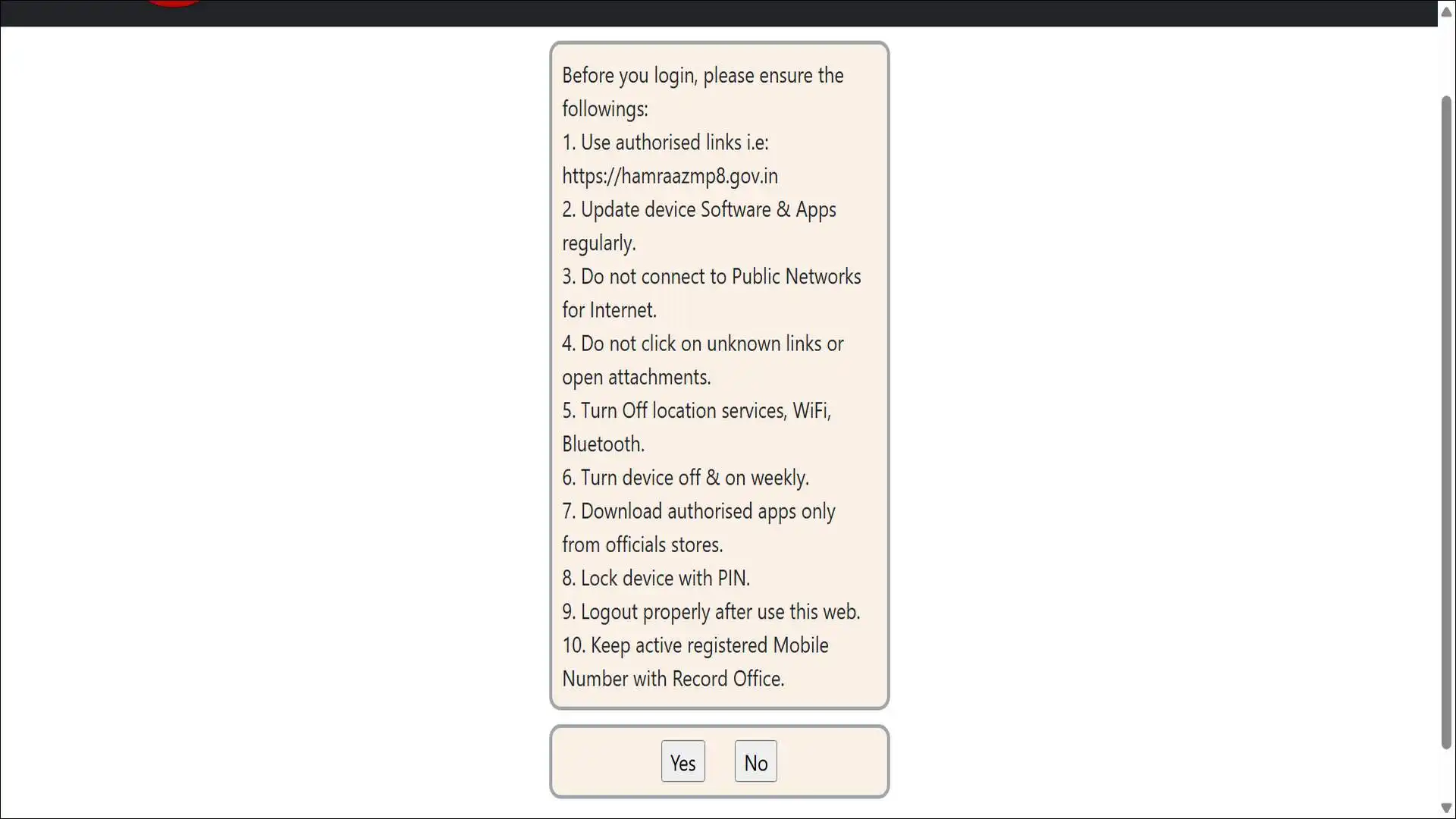
Before using the portal, soldiers must: regularly update device software and apps; avoid public networks; refrain from clicking unknown links or opening attachments; disable location services, Wi-Fi, and Bluetooth when not in use; restart devices weekly; only download apps from official stores; secure the device with a PIN; and always log out properly after use.
And on support: routine maintenance is carried out during late-night hours. If the portal isn’t loading, try again after some time. Official support is never provided through WhatsApp or unofficial Telegram groups.
If you find a fake Hamraaz website, report it to India’s Cyber Crime Portal at cybercrime.gov.in or call helpline 1930.
Hamraaz Web and the 8th Pay Commission (2026–27)
The 8th Pay Commission will change what soldiers see on their Hamraaz payslips — so it’s worth understanding what’s coming before it arrives.
The 8th Central Pay Commission was constituted on November 3, 2025, under Justice Ranjana Prakash Desai. Terms of Reference were notified in January 2025, with recommendations expected in late 2026 or early 2027. Implementation is projected for 2027, with arrears calculated from January 1, 2026.
What 8th CPC Means for Your Hamraaz Payslip
As of January 2026, DA stands at 60% of Basic Pay. Under the 8th CPC, DA is expected to reset to 0%, with previous DA merging into Basic Pay. For a Level 10 soldier with a 7th CPC basic pay of ₹56,100, the projected 8th CPC basic pay under the estimated 1.92× fitment factor would be approximately ₹1,07,712.
In short, your Hamraaz payslip will look significantly different — here’s the expected impact:
What changes to expect in Hamraaz after 8th CPC implementation:
| Payslip Line | 7th CPC (Current) | 8th CPC (Expected 2027) |
|---|---|---|
| BAND PAY | Current basic | Approx. 1.92× increase |
| DA % | 60% of basic | Resets to 0% initially |
| AFPP contribution | Based on old basic | Revised upward |
| AGIF premium | Fixed rate | May be revised |
| Form-16 gross total | Current figure | Higher (arrears from Jan 2026) |
Here’s the thing most soldiers won’t be told: those who are due for MACP in 2026 or 2027 should run the Pay Calculator on Hamraaz under both the current pay matrix and the projected 8th CPC matrix before submitting their option certificate.
The timing of your MACP relative to the 8th CPC implementation date will significantly affect which pay level you land on.
Keep checking the Hamraaz homepage “Baatch-eet” section — official 8th CPC-related Army orders will be published there first.
Hamraaz Web vs Other Defence Portals — Quick Comparison
Soldiers sometimes confuse Hamraaz Web with other Ministry of Defence platforms. To be clear, each portal serves a distinct purpose — they don’t overlap.
| Portal | Purpose | Who Uses It | Access |
|---|---|---|---|
| Hamraaz Web | Pay, service records, grievances, AFPP | Serving Army soldiers | PAN + password |
| Armaan App | Internal communication, notices | Army personnel (officers) | Separate credentials |
| SPARROW | Officers’ ACR (Annual Confidential Report) | Officers only | Separate system |
| HRMS Defence | HR management at unit level | Admin officers | Unit-level access |
| PCDA Pension Portal | Pension for retired soldiers | Retired personnel | Separate login |
Retired soldiers often land on Hamraaz Web looking for pension information — and find they cannot log in. That’s because pension services are handled by PCDA (Principal Controller of Defence Accounts) at pcdapension.gov.in, not through Hamraaz. Hamraaz is exclusively for those currently serving.
Hamraaz Web Security Best Practices — Checklist for 2026
Print this checklist and follow it every time you use the portal.
Before logging in:
- Confirm URL starts with
hamraazmp8.gov.in - Check for HTTPS padlock in the browser
- Ensure you are on a private, trusted network
- Disable Bluetooth and location services on the device
- Ensure no one can see your screen
During your session:
- Never paste your PAN or password into a third-party site
- Do not click any link shared via WhatsApp claiming to be Hamraaz
- Download all needed PDFs before closing
After your session:
- Log out manually — never just close the browser tab
- Clear browser cache on shared or public computers
- Change your password every 3–6 months
Wrapping Up!
Hamraaz Web is not just a payslip website. It is the central nervous system of your financial and service life in the Indian Army.
From downloading your monthly salary to correcting a pay fixation error, from managing your AFPP fund to preparing your family with the “After Me” folder — everything flows through one portal. Still, none of that matters if you land on the wrong URL.
The single non-negotiable rule: only ever use hamraazmp8.gov.in.
With the 8th Pay Commission arriving in 2026–27, your Hamraaz payslip will look significantly different. Understanding every line on it today puts you ahead of every administrative change that’s coming.
Bookmark the official URL. Share this guide with your unit. Fill your “After Me” folder tonight.
Frequently Asked Questions
No. The app was permanently discontinued on March 31, 2023. Any app you find claiming to be Hamraaz is fake and potentially malicious.
Use the Pay Calculator on the portal to verify your correct Basic Pay. If the calculated figure is higher than your actual payslip, submit a grievance through the portal or speak to your Records Office with the Option Certificate.
Yes. The portal is accessible from any internet-connected browser globally. Use a VPN with caution — some VPN exit nodes may be blocked by government security filters.
Log in → go to “My Profile” → update mobile number → verify via OTP. Keeping your mobile number current is critical for password resets.
Yes. It is publicly downloadable from the Hamraaz Web homepage in all major Indian languages, in editable format — no credentials needed.