CUIMS Login 2026: Chandigarh University Portal Guide (New App, Hidden Rules & Fixes)

Most CU students open CUIMS more often than Instagram. Yet 80% of online guides still reference the old third-party app that retired in September 2025.
And here, we have this guide that fixes this gap.
What Is CUIMS?
To put simply, CUIMS stands for Chandigarh University Information Management System — the official student and staff portal at uims.cuchd.in.
It handles every academic and administrative task in one login. Like, students can access attendance, results, fees, leave, hostel, and LMS from a single dashboard.
The university launched this online portal to replace office visits and paperwork. An act of the Punjab State Legislature created Chandigarh University on 10 July 2012, and CUIMS evolved alongside it.
Who uses CUIMS:
| Role | Access Type |
|---|---|
| Students | Full academic + financial dashboard |
| Faculty | Mark’s entry, attendance, and course management |
| Parents | Read-only attendance and results |
| Admissions staff | Application processing |
| Alumni | Verification documents |
Most people think that CUIMS is one URL. However, it actually runs as four interconnected systems — uims.cuchd.in for Mohali, students.cuchd.in for the Lucknow campus, cuchd.blackboard.com for live LMS, and portal.cuidol.in for distance learners.
And using the wrong one creates the #1 reason students think CUIMS is “broken.”
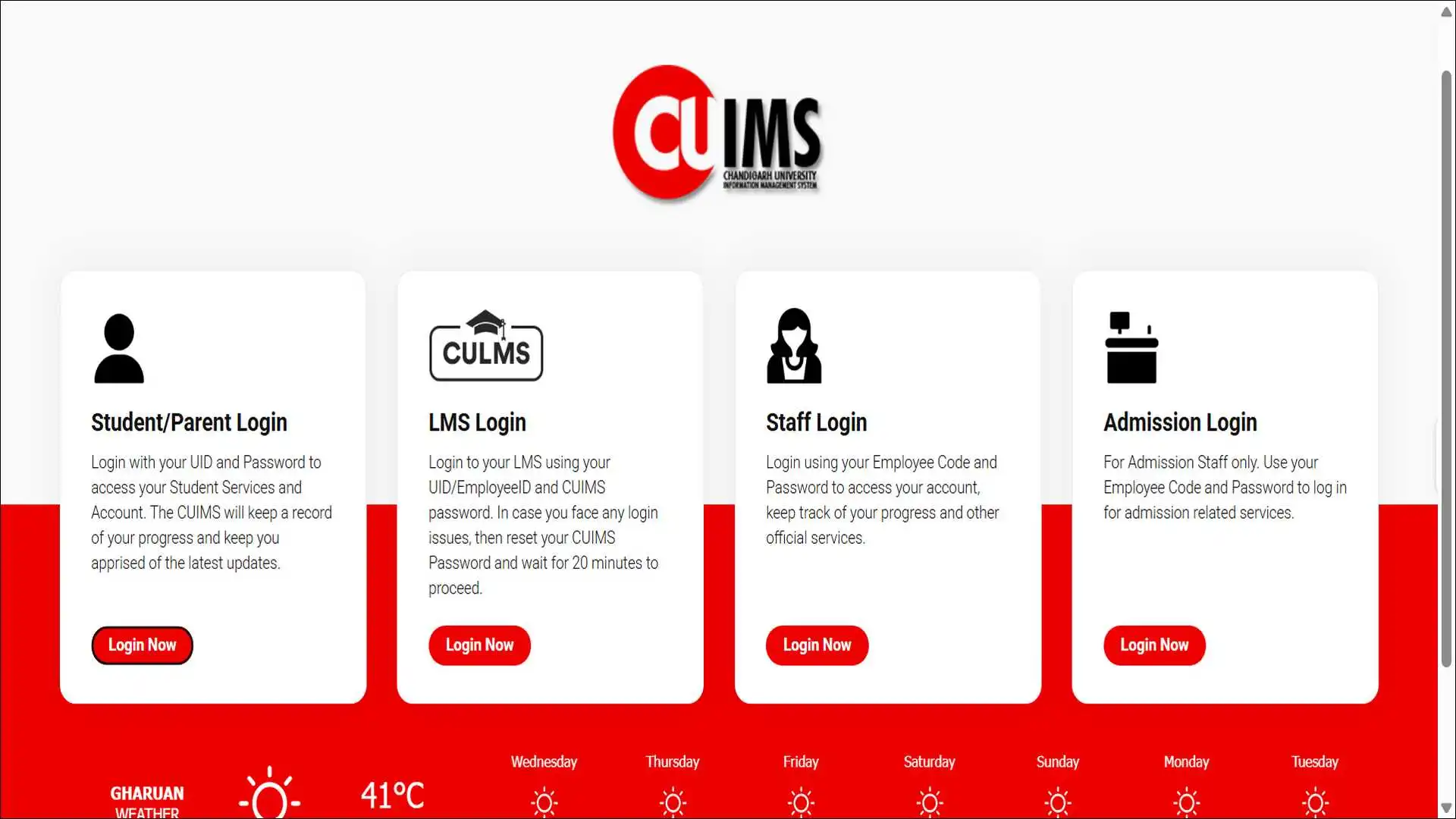
How to Log Into CUIMS (Step-by-Step Guide)
It’s very simple to get logged in to this portal:
- Visit uims.cuchd.in, enter your UID and password, solve the captcha, and click Login.
- Your UID is a 9-digit number that the university issues on admission. Students find their CUIMS ID on their admission letter or fee receipt.
Student login (UID-based)
- Open Chrome or Firefox — avoid Internet Explorer.
- Go to
uims.cuchd.in. - Click Student/Parent Login.
- Type your UID (example format:
2024BBA1234). - Enter your CUIMS password.
- Solve the captcha.
- Press Login.
First-time users: the default password usually matches your date of birth in DDMONYYYY format (e.g., 01JAN2002).
Employee login
Staff enter their Employee Code instead of a UID. The same portal handles both roles. The system records your activity and pushes important updates straight to your dashboard.
Parent login (read-only)
Parents receive separate credentials at admission. They view attendance and results only — no fee or password reset access.
You would be surprised to know that the parental portal is the most underused CUIMS role. Ask the Student Care Centre to activate it if your parents have never received credentials.
The New 2025 CUIMS Mobile App
Chandigarh University relaunched its official CUIMS app in September 2025, replacing all older third-party versions.
The new app introduced features that completely change how students use the portal daily.
New features in the official app:
- A QR-based meal access system for students and staff in hostels
- Smart attendance prediction is built directly into the dashboard
- Refreshed splash screen and improved push notifications
- Faculty directory and leave-tracking tools for staff
Where to download
| Platform | Source |
|---|---|
| iOS | App Store — developer: Chandigarh University |
| Android | Google Play — package com.chandigarhuniversity.cuims |
Old apps to stop using
Two older apps still rank in search results, but no longer count as official, so you should uninstall them, and get the new one:
- CUIMS: Academics Manager by Avant-Garde (now rebranded as Collegia)
- CUIMS by BCTUBE on older Android listings
The Collegia app predicts attendance for the next 30 days. The trade-off: you hand over CUIMS credentials to a third party — a security cost most students never weigh.
During our research, we found that App Store reviews show users confusing the old and new apps. Search results still rank the deprecated versions higher than the official one because the official app launched only eight months ago.
Every CUIMS Module Explained
CUIMS bundles 10+ modules into one dashboard, so it’s a good idea to know about them. Here is what each one does and where students hit friction.
Attendance and timetable
Real-time attendance across all subjects refreshes daily after faculty input. The timetable shows live class status.
Exams, admit cards, and results
Download admit cards two weeks before MSTs and finals. Faculty upload results, so refresh only after the official declaration date.
Fee payment
CUIMS accepts UPI, debit cards, credit cards, and net banking. Chandigarh University also partners with SBI to run State Bank Collect, where students or parents pay fees using SBI net banking — the offline-friendly alternative no blog covers.
LMS access (three different systems)
This confuses thousands of students. Here is the truth:
| System | URL | Used for |
|---|---|---|
| Blackboard | cuchd.blackboard.com | Live online classes |
| CU-VERSE | learn.onlinecu.in | Online degree learners |
| CU IDOL LMS | culms.cuidol.in | Distance education students |
All three accept the same CUIMS UID and password.
Leave application (Medical, Duty, General)
Students apply for leave through CUIMS by opening the Student Leave section and picking Medical, General, or Duty leave.
Re-evaluation
Submit the re-evaluation request and fee via CUIMS within the published window. Fees run around Rs 500 per subject, and processing takes four to six weeks.
[Image suggestion: Infographic showing CUIMS modules as connected nodes around a central dashboard. Alt text: “CUIMS dashboard modules including attendance, fees, LMS, and leave application”]
Attendance Rules: Most Students Find Them Too Late
Chandigarh University requires 75% attendance minimum for exams, but the rules go deeper than that. And for students, it is necessary to know them.
The minimum attendance threshold sits at 75% for basic subjects and 90% for DCPD subjects.
Here are more rules that you should know:
The hidden 5-day rule
If a student remains absent for five continuous days or more, CUIMS automatically converts their status to Non-Active. Non-Active status blocks exam eligibility until the student rectifies it.
Leave categories and impact
| Leave Type | Attendance Benefit | Application Window |
|---|---|---|
| Medical Leave (ML) | University grants if HOD approves | Within 7 days of return |
| Duty Leave (DL) | Full benefit for placements, NCC, SSB | Before the event |
| General Leave | No attendance benefit | Pre-approval needed |
Students must apply for medical leave on CUIMS and attach proper documents — hospital admission, blood reports, test reports, discharge slip, and fitness certificate — within seven days of returning.
What happens below 75%
Students who fail to attain the required attendance receive an I Grade. This usually leads to summer semester detention with additional fees.
Treat 76% as your real floor, not 75%. Faculty corrections, biometric mismatches, and last-minute marking errors regularly drop borderline students below the cutoff days before exams.
Password Reset and Account Recovery
Here’s how you can get your account working again:
- Click Forgot Password on the login page, enter your UID, then verify via OTP or registered email.
- Students reset their passwords independently by entering their date of birth. The system then sends an OTP, after which students change the password successfully.
The 20-minute wait that you should know
After you reset your CUIMS password, wait 20 minutes before logging in. The system needs that time to sync your new credentials across all modules. Trying earlier triggers “invalid credentials” errors and may lock your account.
Account lockout
Too many failed attempts trigger a 24-hour lockout. Contact the IT helpdesk to unlock the account sooner.
Helpline
The toll-free CUIMS support number is 1800 1212 88800. The helpline solves account-level problems faster than self-service options.
Common CUIMS Errors and Their Quick Fixes
Most CUIMS problems fall into seven categories. Here is the fix-it table.
| Problem | Fix |
|---|---|
| Invalid credentials | Check Caps Lock, verify UID format |
| Account locked | Wait 24 hours or call the helpdesk |
| Website not loading | Clear browser cache and cookies |
| Captcha not appearing | Disable extensions, switch to Chrome |
| LMS shows blank page | Log out, clear cache, log back in via the LMS option |
| Password OTP not received | Check spam, verify registered mobile |
| Result not visible | Wait for the official declaration date |
Almost every “CUIMS not working” complaint on student forums traces back to one of three causes — VPN interference, cached old credentials, or trying to access the wrong portal subdomain.
Disable your VPN before you assume the site is down.
CUIMS Troubleshooting Flowchart
Find your problem → follow the path → fix it.
Try these in order:
- Disable any VPN you have running
- Clear browser cache (Ctrl + Shift + Delete)
- Switch to Chrome or Firefox
- Try mobile data instead of Wi-Fi
- Wait 10 minutes — could be maintenance
Pick your error → see the fix
⚠️ Invalid credentials
Turn off Caps Lock. Verify your UID matches the format on your admission letter. Use Forgot Password if unsure.
🔒 Account locked
Wait 24 hours, then retry. For urgent unlock, call IT Helpdesk at 1800 1212 88800.
🤖 Captcha not appearing
Disable browser extensions (ad-blockers, auto-login). Switch to Chrome or Firefox in Incognito mode.
📭 OTP not received
Check spam folder. Verify your registered mobile number with Student Care. Wait 5 minutes and resend.
📺 LMS shows blank page
Log out, clear cache, and log back in via the LMS Login option (not the main student login).
📊 Result not visible
Faculty upload results in batches. Recheck 24 hours after the official declaration date.
🔁 Just reset password
Wait the full 20 minutes before retrying. Earlier attempts trigger another lockout.
❓ None of the above
Call the toll-free helpline: 1800 1212 88800 or visit your Student Care Centre.
Still stuck? CUIMS Helpline: 1800 1212 88800 (toll-free)
Third-Party CUIMS Tools: Helpful or Risky?
Students often use unofficial tools to bypass CUIMS limitations. Some help; others create security risks.
Collegia (formerly CUIMS: Academics Manager)
Collegia works as a modern academic manager offering predictive attendance, a dynamic timetable, and grade analytics. Its algorithm calculates how many lectures students can afford to miss.
The trade-off: you give your CUIMS credentials to a third-party app.
Rizul’s Chrome Extension (CUIMS-Login)
This Chrome extension automatically logs you into UIMS, securely remembers your ID and password, and uses tesseract.js to solve the captcha. It runs as open-source and client-side, but solving captchas automatically may violate university terms.
Safety checklist before installing any tool
- Does the project run as open-source and reviewable?
- Does it store credentials locally or on a remote server?
- Does the developer publish contact details and respond to issues?
- Does the university officially endorse it?
The official September 2025 app now includes smart attendance prediction natively. This makes most third-party predictors redundant for the first time since 2018.
CUIMS Security Best Practices
Your CUIMS account holds attendance, fees, ID proofs, and exam credentials. Treat it like a banking login.
Chandigarh University will never ask for your password by email or phone. Any such request signals phishing.
Daily habits
- Pick a unique password you do not share with social media
- Change your password every semester
- Log out on shared or public devices
- Avoid logging in over public Wi-Fi
- Verify the URL reads exactly
uims.cuchd.inbefore you type credentials - Never share OTPs, even with classmates
Bookmark only the official URL
Search engine results sometimes promote lookalike domains. Save uims.cuchd.in as a browser bookmark and use that link only.
Chandigarh University Quick Facts (Why CUIMS Matters)
CUIMS supports one of India’s largest private universities. Context helps explain its scale.
| Metric | 2025–26 Value |
|---|---|
| NAAC A+ — the youngest Indian university to earn A+ in first cycle | 10 July 2012 |
| NIRF 2025 Overall Rank | 19th among Indian universities (score 61.27) |
| NIRF 2025 Engineering | 31st |
| QS World University Rankings 2026 | Global rank 575 |
| QS Asia 2026 | 109th, India’s #1 private university |
| Programs offered | 154+ across UG, PG, diploma, doctoral |
| Accreditation | NAAC A+ — the youngest Indian university to earn A+ in the first cycle |
| Students placed (2025 batch) | 10,000+ placed by 1,300+ global recruiters |
| Highest international package | INR 1.7 Crore (170 LPA) |
| Highest domestic package | INR 59.9 LPA |
CUIMS processes attendance, fees, and results for every one of these students daily. Its uptime directly affects placements and academic eligibility.
People Also Ask For:
Check the URL bar first — most “down” complaints come from VPN interference or browser cache issues. Clear the cache and retry before you assume a server outage.
Look at your admission letter, fee receipt, or registration confirmation email. The UID runs as a 9-digit number that the university assigns at admission.
Yes. The CUIMS payment gateway accepts UPI, debit cards, credit cards, and net banking.
Results appear only after the official declaration date. Faculty upload them in batches, so refresh after 24 hours.
Use uims.cuchd.in as the main portal. The Mohali subdomain serves campus-specific announcements only.
The web portal needs the internet. The mobile app caches your last-synced attendance and timetable for offline viewing.
Yes, if your parents hold an active parent login. Request it through the Student Care Centre.
It still works, but you share credentials with a third party. The official 2025 app now performs most of the same functions natively.
20 minutes. Reset your CUIMS password and wait 20 minutes before you try again.
1800 1212 88800 — toll-free, available during university hours.
Wrapping Up
CUIMS runs as the only gateway to academic life at Chandigarh University. Its usefulness depends on how well you know the rules, the hidden subdomains, and the new official app from September 2025.
Bookmark uims.cuchd.in only, install the new official app, and treat 76% attendance as your real floor — not 75%. File medical leaves within seven days of returning, never share OTPs, and save the helpline (1800 1212 88800) for genuine emergencies.
Students who never struggle with CUIMS share one habit — they open it every morning, not every emergency. Daily checks catch attendance errors, leave approvals, and fee deadlines before they grow into problems.