18 Best Vocal Remover Tools Tested: AI Model Breakdowns, Cost-Per-Track Math & Troubleshooting
Removing vocals from a song used to need a studio. And now it takes about 60 seconds or less in your browser.
Now, there are plenty of online tools and apps available that make it possible for free or charge a little amount to do so. However, choosing one between these could confuse you.
So, in this guide, we test 18 best vocal remover tools, explain the AI behind them, and share tips that you won’t find anywhere else.
Let’s go ahead and start from the basics to advanced tips through this guide.
Key Findings:
Before you read further, here’s what matters most.
For starters, the vocal remover market is booming fast. According to market.us, the AI vocal remover market will hit $880.1 million by 2034, growing at 17.2% yearly.
And quality now depends on one thing: the AI model. Newer models beat older ones by a wide margin.
| Quick Answer | Our Pick |
|---|---|
| Best free tool | Ultimate Vocal Remover (UVR) |
| Best for beginners | LALAL.AI |
| Best for musicians | Moises.ai |
| Best for professionals | iZotope RX 11 |
| Best for video editors | UniFab |
| Biggest mistake users make | Using compressed MP3 source files |
What Is a Vocal Remover and Why Did 2026 Change Everything?
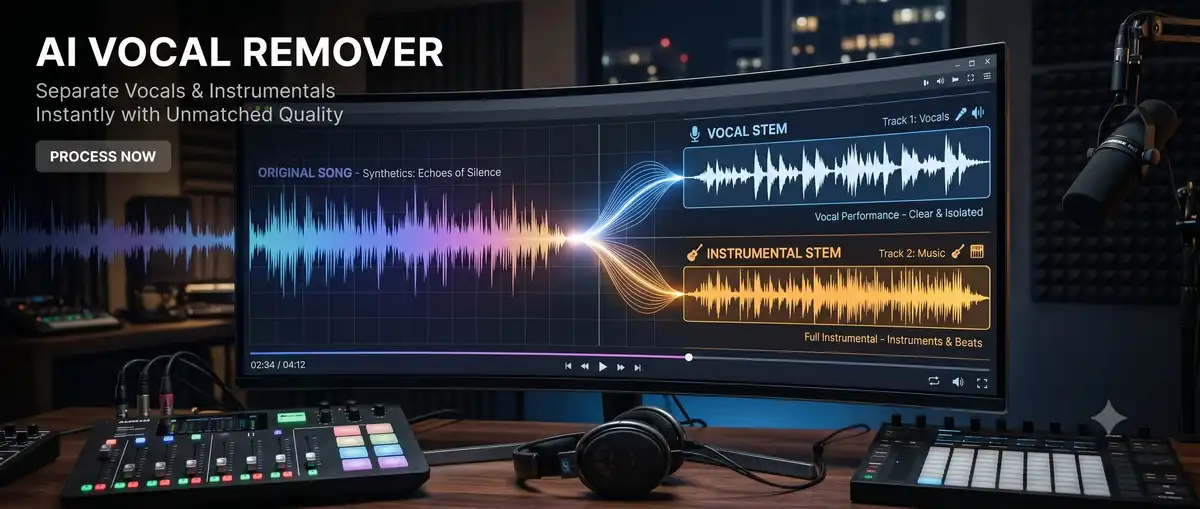
A vocal remover is a tool that separates vocals from instruments in a song. In short, it lets you create karaoke tracks, acapellas, or clean instrumentals.
The technology changed completely because of AI. Old methods butchered sound quality, and new ones preserve it.
The Old Way Would Wreck Your Audio
Traditional vocal removal used phase cancellation. It tried to subtract vocals by flipping stereo channels.
The results were rough. According to Audacity, backing vocals and reverb tails often survived these older methods.
Quality suffered badly, too. Low and mid frequencies got damaged. The instrumental sounded hollow and thin.
How AI Flipped the Script
AI vocal removers learn from data instead of math tricks. They train on thousands of songs to recognise what a voice sounds like.
This changes everything. The AI studies frequency, timbre, and spatial cues, then isolates the voice with surprising precision.
The leap is huge. A teenager with a laptop now does what cost thousands in studio time.
What “Source Separation” Actually Means
Source separation is the science of splitting mixed audio into parts. Engineers call vocal removal a subset of this field.
Think of it like un-baking a cake. The AI identifies each ingredient, then it pulls them apart into separate bowls.
Here’s a simple diagram showing one mixed track splitting into four stems:
How Source Separation Works
The AI studies one mixed file, then splits it into separate stems, like un-baking a cake into its ingredients.
How Do AI Vocal Removers Actually Work?
In basics, AI vocal removers turn sound into pictures, then study those pictures. To put it simply, they use neural networks to spot vocal patterns and strip them out.
The process happens in four clear steps. Let’s break each one down.
The Four-Step Process
First comes spectrogram analysis. The tool converts audio into a time-frequency image. This makes patterns visible to the AI.
Next comes the neural network. It scans the image using encoder-decoder architecture. This is where the voice gets spotted.
Then comes masking. The AI builds a probability map of what’s voice and what’s not, marking each frequency region.
Finally comes reconstruction. The tool rebuilds clean tracks from the mask. Good models leave minimal artefacts behind.
So, how much training does that take? Well, quite a lot.
One free tool, RemoveVocals.ai, trains its model on 1,500+ hours of professional multitracks. That depth drives accuracy.
The AI Model Families You Must Know
Here’s the thing: the model determines quality more than the brand name. So here’s what powers modern tools.
| AI Model | Strength | Used By |
|---|---|---|
| Spleeter (Deezer) | Fast but dated | Old free browser tools |
| Demucs v4 / HTDemucs | Great multi-stem realism | UVR, StemSplit, Moises |
| MDX-Net | Clean instrumentals & acapellas | UVR, ensemble workflows |
| Mel-Roformer | Cleanest vocal isolation | Premium online tools |
| Perseus (proprietary) | Strong dense-mix handling | LALAL.AI |
Spleeter is the old guard. It still works, but it sounds worse on modern tracks.
Demucs, on the other hand, comes from Meta’s research team. It splits songs into vocals, drums, bass, and other parts, and it preserves transients well.
Mel-Roformer leads the pack right now. It uses transformer architecture built for mel-frequency spectrograms, so the vocals come out remarkably clean.
LALAL.AI built its own model called Perseus. The company reports it delivers roughly 15% better vocal extraction than its previous tech.
Why Some Songs Separate Cleanly and Others Don’t
Clean, dry, centred vocals separate best. Heavily processed vocals, though, fight back.
Reverb is the enemy. It spreads the voice across the stereo field, so the AI struggles to grab it cleanly.
Harmonies cause trouble too. Stacked backing vocals blur the line between voice and instrument.
Also read: How to Create a Strong Password in 2026
The Format Mistake That Ruins Results
Your source file format matters more than you think. In fact, this single choice shapes your final quality.
WAV is the gold standard. It’s lossless and keeps every frequency intact.
MP3, by contrast, is the trap. Compression artefacts confuse the AI and introduce noise.
| Format | Quality | Verdict |
|---|---|---|
| WAV | Lossless | Best choice |
| FLAC | Lossless compression | Nearly as good |
| MP3 | Lossy | Avoid if possible |
| M4A/AAC | Lossy | Convert to WAV first |
As a rule, aim for a 44.1 kHz or 48 kHz sample rate. Use 16-bit or 24-bit depth for clean input.
Here’s a side-by-side spectrogram comparison of WAV vs MP3 source separation:
What Are the 18 Best Vocal Remover Tools in 2026?
The best tool depends on your workflow, not on hype. Below are 18 tested options across every category and budget.
We grouped them by type. Find your category, then compare.
Master Comparison Table
| # | Tool | Type | Best For | Free Tier | Starting Price |
|---|---|---|---|---|---|
| 1 | LALAL.AI | Online/App/VST | Karaoke, pro work | Limited preview | ~$18 / 90 min |
| 2 | Ultimate Vocal Remover | Desktop (open-source) | Power users | 100% free | Free |
| 3 | Moises.ai | Web/App | Musicians | 5 separations/mo | Subscription |
| 4 | iZotope RX 11 | Desktop plugin | Studios | No | ~$8/mo |
| 5 | Spleeter | CLI/Python | Developers | 100% free | Free |
| 6 | Adobe Audition | Desktop DAW | Broadcast | No | ~$8/mo |
| 7 | Fadr | Online | Remixers | Free (4 stems) | $10/mo |
| 8 | PhonicMind | Online | DJs | Preview only | $9.99/mo |
| 9 | Media.io | Online | Creators | Yes | Paid tier |
| 10 | EaseUS Vocal Remover | Online/App | Beginners | Yes | Paid tier |
| 11 | Gaudio Studio | Online/App | Creative use | Yes | API pricing |
| 12 | VocalRemover.org | Online | Quick jobs | 100% free | Free |
| 13 | AudioShake | Online/API | Sync licensing | No | Enterprise |
| 14 | UniFab | Desktop | Video editors | Trial | Paid |
| 15 | Kapwing | Online | Educators | Limited | Paid tier |
| 16 | Descript | Online/Desktop | Podcasters | Creator tier | $12/mo |
| 17 | DangoAI | Online | Quality focus | Yes | Paid tier |
| 18 | StemSplit.io | Online | Pay-per-song | Free tier | ~$0.10/min |
Best Free Online Tools
These cost nothing and run in your browser. As a result, they suit casual users and quick jobs.
- VocalRemover.org is the no-fuss option. Upload, process, download. No signup needed.
- Fadr adds remixing tools. It splits songs into four stems for free in MP3 format.
- Gaudio Studio uses its own GSEP model. It launched on mobile in 2025 and earned praise from LANDR and MusicTech.
- RemoveVocals.ai runs entirely in your browser. Better still, it keeps zero user data and offers unlimited use.
Best Paid Online Tools
These cost money, but they deliver cleaner, faster results. They suit serious creators.
- LALAL.AI leads this group. It separates up to 10 stems, including guitar, piano, synths, and strings. It also offers iOS, Android, and a VST plugin.
- Moises.ai targets musicians. It adds chord detection, tempo control, and pitch shifting. The free plan gives 5 separations monthly.
- StemSplit.io charges per song with no expiry. That suits occasional users who hate subscriptions.
- PhonicMind was an early pioneer. Still, newer rivals now beat its quality.
Best Desktop Software
Desktop tools win on privacy, batch processing, and zero rate limits. Naturally, they suit heavy users.
- Ultimate Vocal Remover (UVR) is the power-user favorite. It’s free, open-source, and lets you pick from dozens of AI models.
- iZotope RX 11 is the professional standard. Grammy-winning producers use it for post-production, and the price reflects that.
- Audacity offers a free manual method. It’s basic, but reliable for simple tasks.
- Adobe Audition suits broadcast workflows. Its vocal remover plugin handles dialogue well.
Best Tools for Video Editors
These tools process vocals inside video files. Most audio-only tools simply can’t do this.
- UniFab fills a real gap. It removes or isolates vocals directly within video, which helps YouTubers and multimedia creators.
- EaseUS Vocal Remover handles audio and video. It supports MP3, WAV, M4A, and FLAC.
- Kapwing pairs isolation with an editing studio, so you stay in one browser tab.
- Descript is a podcast editor first. Its stem separation is a useful bonus.
Best Enterprise and API Solutions
These power large-scale and commercial workflows. In other words, they suit businesses, not hobbyists.
- AudioShake specializes in sync licensing and dialogue isolation. It powers LANDR Stems behind the scenes.
- LALAL.AI offers an API and enterprise integration. Developers plug it into their own apps.
- Gaudio Studio provides cloud APIs and on-device SDKs to fit varied business needs.
Top vocal remover tools including LALAL.AI, UVR, Moises, and iZotope RX:
The Top 6 at a Glance
LALAL.AI
Online / App / VST
Clean splits up to 10 stems. Powered by its Perseus model.
Ultimate Vocal Remover
Desktop / Open-source
Free, with dozens of AI models and ensemble mode.
Moises.ai
Web / App
Adds chord detection, tempo control, and pitch shifting.
iZotope RX 11
Desktop Plugin
Studio-standard repair suite used in post-production.
UniFab
Desktop
Removes vocals directly inside video files.
StemSplit.io
Online
Pay per song with no expiry. Runs on Demucs.
Which Vocal Remover Is Right for You?
The right tool matches your specific job and budget. So match yourself to a profile below.
Why does this matter? Because most people overpay or underperform by picking wrong. This section fixes that.
The Karaoke Creator
You want clean instrumentals for singing along. Here, quality matters more than control.
Pick LALAL.AI or VocalRemover.org. Both make polished, publish-ready karaoke tracks.
For UVR users, the Kim Vocal 2 model works best. It preserves backing vocals well.
The Music Producer or DJ
You need clean stems for remixing and sampling. In this case, precision is everything.
Pick UVR or LALAL.AI. For commercial client work, AudioShake delivers reliable quality.
That said, producers running many tracks should consider cost. UVR is free and batch-processes locally.
The Content Creator or YouTuber
You want background music or to dodge copyright strikes. So speed and convenience win.
Pick Fadr, Moises, or Media.io. They process fast with no setup.
To show the payoff: one creator told remove.music they cut a podcast re-recording cost from $1,400 to zero by stripping venue music.
The Podcaster
You need clean dialogue from music-heavy recordings. Here, voice clarity is the goal.
Pick Descript, Kapwing, or remove.music. They lift voices from messy backgrounds.
What’s the real win? These tools rescue interviews recorded in noisy venues, saving otherwise unusable audio.
The Music Teacher or Student
You study arrangements and practice with backing tracks. For that, interactivity helps.
Pick Moises.ai. It adds tempo control, chord detection, and a smart metronome.
Those practice features justify the subscription. Casual splitters can’t match them.
The Developer or Power User
You want full control and no limits. Better yet, technical setup doesn’t scare you.
Pick UVR or Spleeter. Both are free and open-source.
The difference is the interface. Spleeter runs via Python command line, while UVR offers a friendlier GUI with model choices.
Also read: Google Flights Hacks 2026
How Do You Use a Vocal Remover Step by Step?
Most tools follow the same simple flow: upload, choose, process, download. The details just differ slightly per tool.
Here are clear walkthroughs for four popular options.
How to Use LALAL.AI
- Open LALAL.AI in your browser. No installation needed.
- Drag and drop your audio or video file, and the AI starts processing.
- Preview the result before downloading. Dense mixes with reverb may need a second look.
- Then download your vocal and instrumental stems. Done in seconds.
How to Use Ultimate Vocal Remover for Best Results
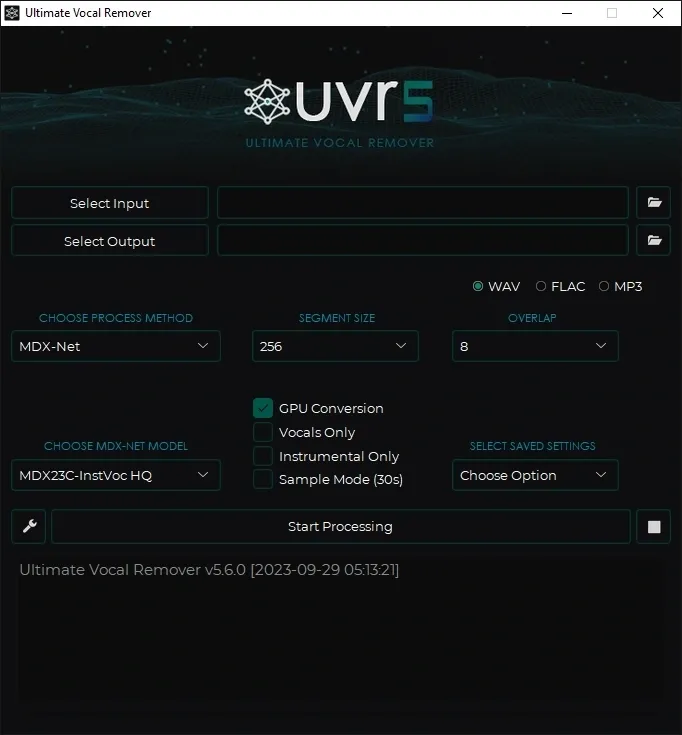
- Download UVR from its official GitHub repository. Install and open it.
- Download a few models first. To save space, start with MDX-Net and Demucs.
- Enable GPU conversion if you own an NVIDIA card. This speeds processing dramatically.
- For the cleanest output, use Ensemble Mode. It stacks multiple models together.
How to Use Moises.ai on Mobile
- Download the Moises app on iOS or Android. Create a free account.
- Upload your song, and the AI separates it into stems.
- From there, use the extra tools to practice. Adjust tempo, detect chords, or shift pitch.
How to Use Audacity’s Free Manual Method
- Open your stereo track in Audacity. This method needs stereo audio.
- One caution: don’t normalize or apply effects first. Both channels must match exactly for cancellation.
- Apply the vocal removal effect, and center-panned vocals cancel out.
- Expect limits, though. Backing vocals and reverb tails often remain audible.
How Do You Get Studio-Quality Results?
Studio quality comes from good input and smart settings, not just good tools. These tips separate amateurs from pros.
Most guides skip this section entirely. That’s your edge.
Always Start With the Best Source File
- Garbage in, garbage out. In our experience, a clean source beats any premium tool.
- Use lossless WAV or FLAC files. Skip YouTube rips and heavy MP3 compression.
- Why bother? Because those artifacts confuse the AI, creating muddy, noisy output.
The Phase-Inversion Test Nobody Tells You About
- This test verifies if your stems are truly perfect. Yet almost no creator runs it.
- Take your separated stems. Mix them back together at unity gain.
- Then phase-invert them against the original file. Perfect separation produces silence.
- What’s left over tells the story. Any leftover sound reveals separation errors. It’s an instant quality check.
Ensemble Mode: Stacking Models for Cleaner Output
- Ensemble mode runs several AI models at once, then averages the results.
- This reduces artifacts that single models miss, and UVR makes it easy.
- We’ve found that a proven recipe combines RoFormer and MDX-Net Voc_FT. It trims backing vocal leaks.
Genre-Specific Tips
Different genres need different handling. Simply put, one setting doesn’t fit all.
| Genre | Challenge | Tip |
|---|---|---|
| Pop | Stacked vocals | Use Mel-Roformer models |
| Hip-Hop | Autotune artifacts | Try MDX-Net Voc_FT |
| Metal | Dense guitars | Use higher aggression settings |
| Jazz | Acoustic blend | Use ensemble averaging |
| Classical | Harmonic overlap | Expect more bleed |
Live recordings need higher aggression. In fact, crowd noise demands settings around 15-20.
Post-Processing Your Stems
Sometimes the AI leaves traces. That’s where post-processing cleans them up.
Apply a narrow notch filter at vocal frequencies. This attenuates residual vocals.
Then use de-reverb and noise reduction tools. Many platforms include these built-in.
How Do You Fix Common Vocal Remover Problems?
Most problems trace back to bad source files or wrong settings. Here’s how to fix the frequent ones.
This troubleshooting guide is what users actually search for. Yet competitors ignore it.
“My Instrumental Still Has Ghost Vocals”
This usually means stereo effects or backing vocals. The voice simply spreads too wide to grab.
Try a different AI model. Some handle wide vocals better than others.
Also, switch to studio or high-quality mode, and skip the fast processing option.
In UVR, switch to MDX-Net Voc_FT. It catches whispery vocal ghosts.
“The Separation Sounds Muddy or Distorted”
Your source file is likely the culprit. Compressed MP3s cause this often.
The fix is simple: re-download a lossless version. Use WAV or FLAC instead.
Older models also struggle here. If so, try a newer Demucs v4 or RoFormer tool.
“Backing Vocals Won’t Disappear”
Backing vocals share frequencies with the lead, so clean removal is genuinely hard.
Use a tool with lead/back splitting. LALAL.AI separates these specifically.
Still, accept some limits. Perfect removal isn’t always possible with dense harmonies.
“Processing Is Taking Forever”
Slow speed usually means CPU-only mode. Your processor handles everything alone.
The quick fix? Enable GPU acceleration in settings. An NVIDIA card cuts time sharply.
To put the gap in numbers: a 4-minute song takes about 30 seconds with GPU, or 3 to 5 minutes on CPU only.
Best Settings by Tool
Here’s a quick reference for cleaner output across popular tools.
| Tool | Recommended Setting |
|---|---|
| UVR (karaoke) | Kim Vocal 2 or MDX-NET Voc FT |
| UVR (4-stem) | htdemucs or htdemucs_ft |
| LALAL.AI | Preview before full download |
| Source files (all) | WAV, 44.1 kHz, 16-bit minimum |
What Are the Overlooked Uses Beyond Music?
Vocal removers do far more than karaoke. In fact, they rescue podcasts, films, lectures, and field recordings.
This huge audience gets ignored by most articles. But the use cases are real and growing.
Podcasters: Saving Music-Ruined Recordings
Podcasters record interviews in noisy venues, and background music wrecks the audio.
Vocal removers lift the voice out cleanly, so the conversation lands on its own track.
The payoff is big. This salvages otherwise unusable recordings and saves expensive re-recording sessions.
Film and TV Post-Production: Dialogue Separation
Sound editors separate dialogue from background scores. They also repurpose audio for promos.
AI does this without lowering soundtrack quality. Old methods couldn’t.
This flexibility helps live performances and archival projects, all while respecting the original file.
Language Learners: Isolating Speech
Learners study dialogue buried under music. Isolation makes that speech clear.
Tools detect human speech patterns, then they lift voices from mixed audio.
The result? Better intelligibility and less distraction during study.
Educators: Clean Voice From Lectures
Course creators remove music from tutorials. They also extract clean voice for captions.
This helps caption generation and re-edits. On top of that, it boosts production value.
There’s a bonus, too. The cleaner voice transcribes more accurately, saving editing time.
Journalists: Field Recording Cleanup
Journalists capture audio in chaotic settings, where music and noise intrude constantly.
Vocal removers produce broadcast-ready voice tracks. These suit transcription and subtitles.
In short, the technology turns messy field audio into usable material.
Four-panel illustration showing podcaster, film editor, teacher, and journalist using vocal removal:
Beyond Karaoke: Real-World Uses
Podcasters
Strip venue music from interview recordings.
Film & TV Editors
Separate dialogue from background scores.
Educators
Pull clean voice from lectures for captions.
Journalists
Clean field recordings for broadcast.
What Are the Legal Rules Around Vocal Removal?
The tool is legal, but how you use the output is the real question. Ultimately, copyright depends on your purpose.
Most articles give a vague warning. This section gives real clarity.
Personal Use vs Commercial Use
Personal use sits in safer territory. Practising or singing at home rarely triggers issues.
Commercial use, however, changes things. Selling or monetising copyrighted instrumentals may need a license.
Remember: the recording itself stays copyrighted. Removing vocals doesn’t strip that protection.
Fair Use and Platform Rules
Many platforms allow non-commercial or transformative content, and educational use often qualifies.
But platforms enforce inconsistently. YouTube flags AI content, yet enforcement varies widely.
It cuts both ways. Some labels embrace remixes as free marketing, while others send takedown notices fast.
What Happens With a Copyright Strike
Strikes hurt your channel. They can demonetise or remove your content.
Worse, repeated strikes risk account termination. The stakes rise with each one.
So check a song’s copyright status before monetising. This avoids nasty surprises.
Safe Zones for Remixing
Royalty-free tracks remove the risk. So do properly licensed songs.
Use these for commercial projects. They give creative freedom without legal worry.
When in doubt, get clearance. Permission beats a takedown notice every time.
How Can You Make Money With Vocal Remover Tools?
You can monetise vocal removers through content, stems, services, and libraries. The demand, it turns out, is real and growing.
Almost no competitor covers this angle, which makes it a strong hook.
Start a Karaoke YouTube Channel
Create instrumental versions of popular songs and build a karaoke library.
Monetise through ads and a loyal audience. Karaoke content has steady demand.
One caveat: mind copyright rules. Use licensed or cleared tracks to stay safe.
Sell Stem Packs
Producers buy clean stems for sampling, and platforms like Beatstars host these sales.
Extract drums, bass, and other stems, then package and sell them.
Quality matters here, though. Use ensemble workflows for professional results.
Offer Remix Services
Freelance remixing pays well. Platforms like Fiverr and SoundBetter connect you to clients.
Use vocal removers to extract acapellas, then build new versions.
In effect, your separation skills become a sellable service. Clean stems command higher rates.
Build Background Music Libraries
Content creators need vocal-free music constantly. So supply it.
Strip vocals from licensed tracks and build instrumental libraries for tutorials and ads.
Then sell or license these collections. Recurring demand creates recurring income.
What Does the Future of Vocal Removal Look Like?
The future is real-time, on-device, and even cleaner. Models keep improving fast.
This forward-looking view gives your article lasting value. Few competitors even attempt it.
Real-Time Separation
Newer systems analyze raw audio streams instantly, splitting tracks in real time.
This enables live performance and streaming uses, with no preprocessing required.
Picture this: pulling vocals during a live DJ set. That future is arriving.
On-Device Processing
Cloud tools raise privacy concerns. On-device processing solves that.
Models now run on phones and laptops, and some use WebAssembly in the browser.
What this means is speed and privacy together. Your files never leave your device.
Next-Generation Models
Mel-Roformer leads today. But research moves fast.
Transformer architectures keep getting better, and each generation reduces artifacts further.
Training data keeps expanding too. More data means smarter, more versatile separation.
Industry Impact
Labels are responding to AI separation. Some even share stems officially now.
Take 2024, when Billie Eilish’s team released isolated stems for fans. The move followed viral AI remixes.
The relationship is shifting. AI separation is reshaping how the industry handles music.
Wrapping Up
Pick your vocal remover by use case, not by hype. The right match saves money and frustration.
Vocal remover tool recommendations by user type and budget:
Quick Picker
Which Vocal Remover Fits You?
Karaoke Creator
Polished sing-along tracks
LALAL.AI
$ PaidProducer / DJ
Clean stems for remixing
UVR
FreeContent Creator
Fast background music
Fadr
Free / $Podcaster
Clean dialogue rescue
Descript
$ PaidTeacher / Student
Practice with backing tracks
Moises.ai
Free / $Pro / Studio
Highest-precision repair
iZotope RX 11
$$ PremiumDeveloper / Power User
Full control, no limits
Spleeter
FreeFree = $0 · $ = budget · $$ = premium. Pick by job, not by hype.
Here’s the surprising part: free tools like UVR rival paid ones. Premium tools just win on convenience and speed.
Either way, remember the fundamentals. Start with lossless files. Run the phase-inversion test. Use ensemble mode for tough tracks.
And the biggest mistake stays the same. Feeding the AI compressed MP3s wrecks your output.
Looking ahead, the future points to real-time, on-device separation. The technology only gets better from here.
| Final Quick Reference | Best Choice |
|---|---|
| Free + powerful | Ultimate Vocal Remover |
| Easy + clean | LALAL.AI |
| Musician practice | Moises.ai |
| Professional studio | iZotope RX 11 |
| Video work | UniFab |
| No subscription | StemSplit.io |
Frequently Asked Questions
Quick answers to the questions people ask most.
Are vocal removers free to use?+
Yes, many vocal removers are completely free. Ultimate Vocal Remover and Spleeter are free and open-source. VocalRemover.org and RemoveVocals.ai run free in your browser with no signup needed. Paid tools add speed, more stems, and convenience.
What is the best free vocal remover?+
Ultimate Vocal Remover (UVR) is the best free option for power users. It is open-source and lets you choose from dozens of AI models, including MDX-Net and Demucs. For quick browser jobs with no setup, VocalRemover.org and Fadr work well.
Why does my instrumental still have faint vocals?+
Faint vocals usually come from stereo effects, reverb, or backing vocals that spread across the stereo field. Try a newer AI model, switch to high-quality mode, or use a tool with lead and backing vocal separation. Starting with a lossless WAV source also helps.
What audio format gives the best vocal removal results?+
WAV gives the best results because it is lossless and keeps all frequency information. FLAC is nearly identical. Avoid MP3 when possible, since compression artifacts confuse the AI and add noise. Use a 44.1 kHz or 48 kHz sample rate at 16-bit or 24-bit.
Is it legal to remove vocals from a copyrighted song?+
Removing vocals for personal use is generally low risk. Commercial use of copyrighted instrumentals may require a license. The recording stays copyrighted even after vocal removal. Always check the song’s copyright status before monetizing, or use royalty-free and licensed tracks.
How long does AI vocal removal take?+
Most online tools process a song in seconds to a couple of minutes. For desktop tools like UVR, a 4-minute song takes about 30 seconds with GPU acceleration or 3 to 5 minutes on CPU only. Enabling GPU conversion speeds processing dramatically.
Which AI model is best for vocal removal in 2026?+
Mel-Roformer is one of the top vocal isolation models in 2026, producing clean stems with minimal bleed. HTDemucs is excellent for multi-stem separation. For best results, many users combine MDX-Net with Demucs v4 in ensemble mode.
Can I remove vocals from a video file?+
Yes. UniFab removes or isolates vocals directly inside video files, which most tools cannot do. EaseUS Vocal Remover and Kapwing also handle both audio and video, making them useful for YouTubers and video editors.