Google Block Breaker: A Fun, Addictive Game to Boost Your Day

Google Block Breaker is a hidden gem tucked into Google’s search engine, delivering a modern take on the classic Breakout arcade game. This browser-based game is simple to play, instantly accessible, and surprisingly addictive.
Whether you’re taking a break from work or looking for a quick mental reset, this game offers a perfect mix of challenge and fun.
In this article, we’ll learn how to play Google Block Breaker game, what makes it special, tips to master it, and why it’s worth your time.
Let’s explore why Google Block Breaker is more than just a casual distraction.
What Is Google Block Breaker?
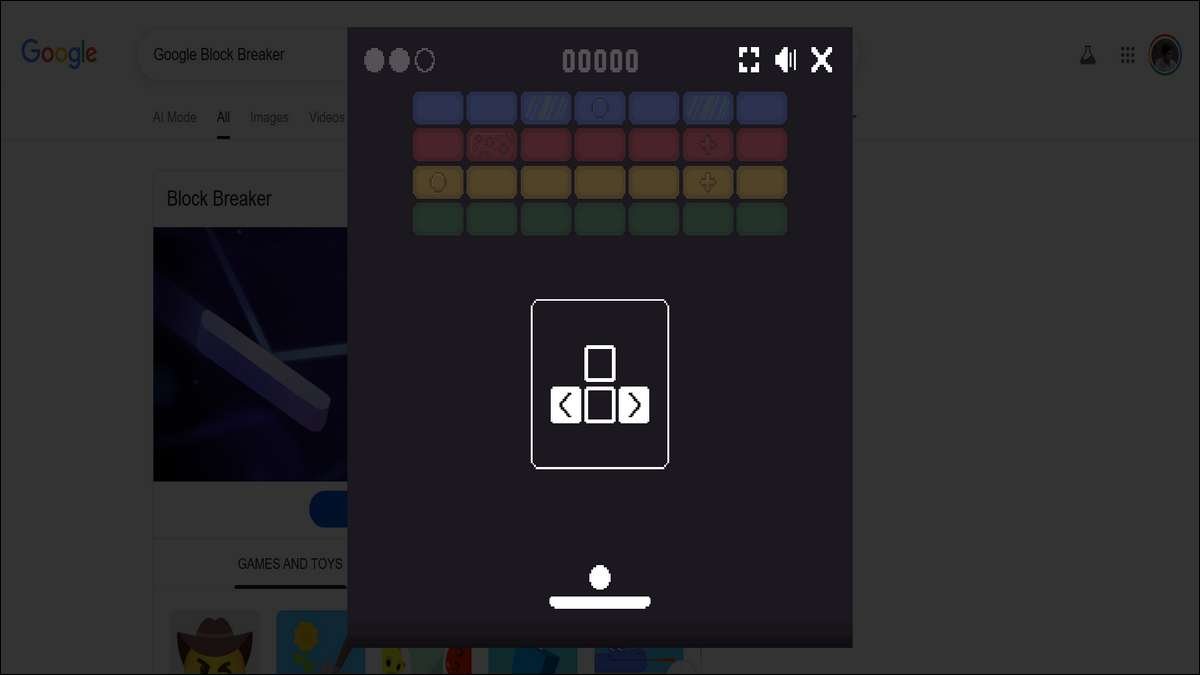
Google Block Breaker is an Easter Egg game embedded in Google’s search results, inspired by Atari’s iconic Breakout. Players use a paddle to bounce a ball and break rows of colored blocks.
No downloads or apps are needed—just a quick search on Google. According to Search Engine Magazine, this game is designed for instant play across devices, making it a global favorite for casual gamers.
To start, type “Google Block Breaker” into Google’s search bar. A “Play” button appears at the top of the results, launching the game instantly.
For non-English users, try searching terms like “Rompebloques” (Spanish) to find it. As digital marketing expert Barsha Bhattacharya notes, its seamless accessibility sets it apart, requiring no setup or account.
Also read:
How to Play: Clear Steps for Instant Fun
Getting into Google Block Breaker is easy, but mastering it takes practice. Here’s how to jump in:
- Find the Game: Search “Google Block Breaker” on google.com. The game loads directly in the browser, exclusive to Google’s platform.
- Understand the Setup: You control a paddle at the screen’s bottom using your mouse or finger (on mobile). A ball bounces off the paddle to hit colorful blocks (green, yellow, red, blue). Some blocks need multiple hits, and others drop power-ups.
- Gameplay Goal: Clear all blocks by hitting them with the ball. Don’t let the ball fall past the paddle, or you lose a life. Power-ups like extra balls or wider paddles can help.
- Sound Options: The game starts silent, but you can toggle the volume icon for fun sound effects that enhance the experience.
Here’s A table comparing Google Block Breaker’s features (e.g., no installation, power-ups, cross-device play) to apps like Bricks Breaker Quest:
| Feature | Google Block Breaker | Bricks Breaker Quest |
|---|---|---|
| Installation Required | No; browser-based Easter egg accessible via Google search. | Yes; requires download from Google Play or App Store. |
| Power-Ups | Yes; includes multi-ball, larger paddle, lasers, dual blasters, and TNT explosions. | Yes; features boosters like lightning, laser beams, and various ball types for enhanced clearing. |
| Cross-Device Play | Yes; supports desktop (mouse/keyboard) and mobile (touch) seamlessly. | Yes; optimized for mobile and tablet devices, with one-handed gameplay support. |
| Number of Levels | Over 100 progressive levels with increasing difficulty. | Thousands of stages (up to 9,000+), plus modes like 100 Balls challenge. |
| Offline Play | Yes; plays in browser once loaded, no ongoing internet needed. | Yes; supports offline gameplay without internet connection. |
| Multiplayer | No; single-player only. | Yes; includes multiplayer and PvP modes. |
| Ads and Monetization | No ads; completely free with no in-app purchases. | Contains ads; includes in-app purchases for gems and ad removal options. |
| Accessibility | Instant access via search; no account required, available in multiple languages. | Requires app installation; supports achievements, leaderboards, and multiple languages. |
Why It’s So Addictive
Google Block Breaker stands out with features that keep you coming back:
- Power-Ups: Grab enhancers like dual blasters or larger paddles to clear blocks faster.
- Smooth Design: Bright colors and fluid animations make every bounce visually satisfying, as noted by Search Engine Magazine.
- Instant Access: No downloads mean you can play anywhere, anytime, on any device.
- Global Appeal: Available in multiple languages, it’s a hit worldwide.
These elements make it both relaxing and engaging. A 2024 Entertainment Software Association report found that 65% of adults play casual games to unwind, and Google Block Breaker fits the bill with its quick, stress-busting gameplay.
My Block-Breaking Adventure
A few weeks ago, I was digging into Google’s Easter Eggs for a work project when I found Block Breaker. What started as a quick test turned into a 45-minute gaming session!
The nostalgia hit hard—it reminded me of sneaking quarters into an old Breakout machine at a local arcade. One moment stood out: I snagged a dual-blaster power-up just as I was about to lose, and it cleared half the screen in seconds.
I couldn’t help but grin. I even texted a friend to beat my 2,300-point score, sparking a fun mini-competition.
That mix of nostalgia and excitement is what makes this game so special.
Tips to Crush It
Want to dominate Google Block Breaker? Try these strategies, backed by gameplay mechanics and insights from gaming blogs:
- Chase Power-Ups: Hit blocks that drop power-ups early to gain advantages like extra balls or wider paddles.
- Angle the Ball: Slide the paddle slightly to hit the ball at different angles. Edge hits send it sharp, targeting hard-to-reach blocks.
- Focus on Tough Blocks: Red and blue blocks often need multiple hits. Prioritize them to clear the board faster.
- Stay Calm: Smooth, steady paddle movements keep the ball in play. Panic swipes lead to mistakes.
- Use Sound: Turn on audio for cues that help time your paddle, especially when the ball speeds up.
Kotaku’s 2025 gaming tips suggest that block-breaking games like this can sharpen reaction times, which might even help with real-world tasks requiring quick reflexes.
Why You Should Play
Google Block Breaker isn’t just fun—it’s got benefits:
- Stress Buster: A 2023 American Psychological Association study found 70% of casual gamers feel less stressed after playing. This game’s quick rounds are perfect for a mental break.
- Brain Boost: It hones hand-eye coordination and strategic thinking as you predict the ball’s path.
- Social Fun: Share your high score on platforms like X to connect with friends or challenge others.
For businesses, it’s a reminder of Google’s knack for engaging users.
Marketing guru Neil Patel (2024) points out that interactive features like this can inspire brands to create content that keeps users on their sites longer, boosting SEO per Google’s Search Central guidelines.
Other Games to Try
Love Google Block Breaker? Check out these alternatives:
- Bricks Breaker Quest: Offers offline play and thousands of levels, per Search Engine Magazine.
- Idle Breakout: A strategic version where you earn upgrades, available on Coolmath Games.
- Break the Bricks: A Chrome Web Store game with multi-device support.
None match Google Block Breaker’s no-fuss browser access, though.
A Lesson for Brands
Google Block Breaker shows how fun, interactive content can captivate users.
Businesses can take a cue: adding mini-games or engaging tools to websites can increase visitor time, a key SEO factor according to Google.
Imagine a retailer with a quick game that rewards players with discounts—it’s a win for engagement and loyalty.
Ready to Break Some Blocks?
Google Block Breaker is a blast of fun wrapped in simplicity. Whether you’re chasing a high score or just killing five minutes, it’s a game that delivers.
Fire it up, share your best score online, and see how you stack up. What’s the highest score you’ve hit? Let us know below!
Disclaimer: This draft was AI-assisted and reviewed/edited by a subject-matter expert.
![Wordle Solver: Try Hard Guides Tool + Data Strategies [2026]](https://www.techdemis.com/wp-content/uploads/2026/06/Try-Hard-Guides-Wordle-Solver-800x450.webp)