What Is Paddle.net on My Bank or Credit Card Statement? Consumer Guide to Charges, Verification, and Refunds
You open your banking app and notice a charge listed as “PADDLE.NET * SOMETHING.” This usually happens with digital tools and subscriptions. Paddle.net is the official customer support site for Paddle, a company that processes payments for thousands of software makers.
The charge is normally legitimate because Paddle serves as the merchant of record. It handles the transaction, taxes, and compliance so the original company does not have to.
In this guide, we give you complete steps to check any charge, cancel subscriptions, or request refunds. Here, you’ll find practical examples, a comparison of other billing styles, and tips that come from how the system works right now.
Key Takeaways
- Paddle.net charges almost always come from real subscriptions or purchases you made through tools that use Paddle.
- Paddle works with more than 10,000 businesses and operates in over 200 countries.
- You can locate most purchases quickly by visiting paddle.net and using your signup email.
- Cancellation and refunds go through simple forms on the same site.
- Most surprises happen because of automatic renewals rather than anything wrong.
- Keep your signup emails and confirmation messages. They help you verify charges fast.

Paddle.net Serves as the Official Hub for Managing Purchases Processed by Paddle
Paddle.net is the dedicated customer portal where you manage any purchase or subscription processed by Paddle.
Paddle acts as the merchant of record for software and digital product companies. When you buy through one of their partners, Paddle becomes the official seller on record. That is why the charge appears under Paddle.net instead of the tool name you recognize.
This model lets software companies focus on their product while Paddle handles global payments and taxes. Paddle reports on its site that it has processed 190 million transactions and works with more than 10,000 businesses. These numbers explain why you see the descriptor more often now.
Many tools choose this route so they can sell in over 200 countries without setting up local tax systems in each place.
You still get the product or service you ordered. The original company usually provides support for how the tool works. Paddle handles billing questions, receipts, and refunds through the paddle.net site. This split is normal for merchant of record services.
Here’s a simple visual explaining Paddle’s role as merchant of record with arrows showing flow from the software company through Paddle to you, the buyer:
Why the Charge Shows Paddle.net Instead of the Software Company Name
The charge shows Paddle.net because Paddle legally sells the product to you as the merchant of record. The software company receives the money after fees and continues to support the tool itself. Your statement carries Paddle’s name because that is who processed the payment and handled the taxes.
This setup is common and helpful for global tools. Paddle automatically calculates and remits sales tax or VAT across many jurisdictions. You often get smoother checkout and access to apps that might otherwise limit sales to certain regions only. The trade-off is one extra step when you need to manage billing later.
You might see Paddle.net charges for note apps, security tools, backup services, or productivity platforms. Each company picked Paddle so it could reach users worldwide without extra compliance work. The result for you is usually reliable payment handling even when buying from smaller or newer tools.
Is Paddle.net Legitimate and Safe? My Direct Check of the Facts
Yes, Paddle.net is legitimate and safe for normal use.
Paddle is a real company founded in 2012. It maintains PCI compliance for payment data and follows GDPR privacy rules. Public records and company statements show no pattern of fraud. Most user questions on review sites come from forgotten subscriptions rather than problems with the platform.
I checked Paddle’s official resources and recent updates. The company shares clear explanations about why charges appear and how to resolve them. Trustpilot shows an overall rating of 4.0 out of 5 from more than 10,000 reviews. People often mention easy receipt access once they reach the right form.
Some feedback notes slower support replies during busy times. The basic portal for lookups feels straightforward. I rate overall legitimacy and basic security practices at 4.5 out of 5. Response speed for complex requests is the main area that could improve.
- Paddle maintains PCI compliance for handling card information.
- The company follows GDPR standards for personal data.
- You can verify everything yourself through the official paddle.net address.
You can stay safe by typing paddle.net directly into your browser instead of clicking links from emails. If anything feels unusual, contact your card issuer as a backup option.
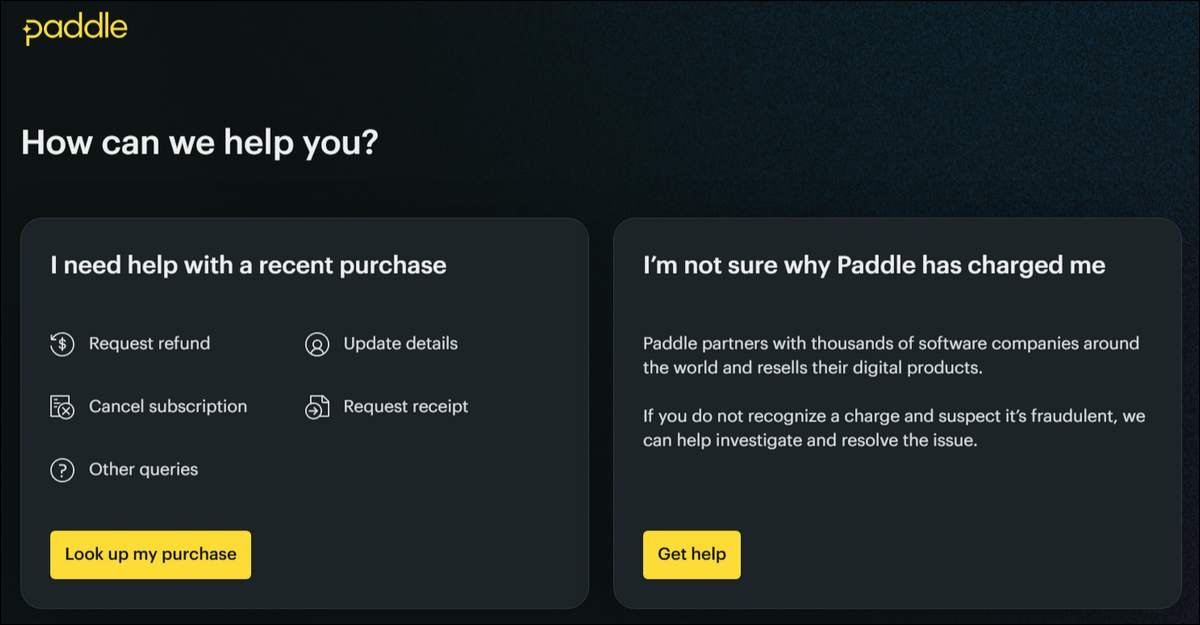
How to Verify Your Paddle.net Charge Step by Step
You verify a Paddle.net charge by going to the official site and entering your signup email or transaction details.
- The process usually takes just a few minutes once you have the right information ready.
- Start by visiting paddle.net in your browser.
- The page shows clear options under a heading that asks how the team can help.
- Options include help with a recent purchase, request a refund, cancel a subscription, request a receipt, or other queries. There is also guidance for people who do not recognize a charge.
- Pick the option that fits your situation.
- Most people begin with the recent purchases. This often leads to a simple email lookup.
- Enter the address you used when signing up for the tool. Paddle then displays matching transactions.
- If the email search does not find the charge, use the detailed transaction form.
- It asks for the amount, payment date, payment method, and last four digits of your card.
These details help locate older records even when the email on file is slightly different.
I followed the steps described on the site using example scenarios from support pages. The email lookup needs only one field and returns results quickly with the correct address.
The detailed form adds a couple more fields but gives a reliable backup path. I rate the initial lookup experience 4.5 out of 5 for simplicity when you remember your signup email.
After you find the purchase, you see options to request a receipt or move to cancellation. Take a quick screenshot or note the transaction reference for your records.
Common Paddle.net Charges and What They Usually Mean
You are not alone when these charges appear. Many well-known tools use Paddle for billing. Here are frequent examples you may recognize in 2026.
Common Paddle.net Charge Examples
- PADDLE.NET * ALFRED — Usually Alfred Powerpack, a popular Mac utility. Often one-time or annual.
- PADDLE.NET * Classroom or similar education tools — Common with productivity or learning apps on monthly or yearly plans.
- PADDLE.NET * GETASTRA or ASTRAWAF — Often linked to security or firewall services on subscription.
- PADDLE.NET * Fastmail — Privacy-focused email service billed monthly or yearly.
- PADDLE.NET * CrashPlan — Cloud backup software on recurring plans.
You may have more than one active Paddle.net charge if you use several tools that choose this processor.
The portal lets you view them together once you enter your email. This view makes it easy to review all recurring costs in one place.
Some charges are one-time purchases for licenses or add-ons. Others are automatic monthly or yearly renewals. Automatic renewal is the top reason people feel surprised by a charge they do not remember right away.
How to Cancel a Subscription or Request a Refund
You cancel or request a refund by using the clear forms on paddle.net. The steps are simple once you locate the transaction.
- Go to paddle.net and choose “Cancel subscription” or “Request refund” from the help options. The form asks for basic details so Paddle can match your request to the correct record.
- You may need the amount, date, and last four card digits again. Some cases also work better with your original confirmation email.
- After you submit, Paddle reviews the information.
- Cancellations usually stop future renewals right away or at the end of the current period. Refunds depend on the specific vendor policy and how much time has passed.
- Many digital products allow refunds within 14 or 30 days, though exact windows vary.
I traced the flow using the options listed on the site. The forms are short and ask only what is needed. Public feedback shows success rates when people include clear details and follow up politely if asked for more information.
Response times range from the same day to several business days. Overall, I would rate the cancellation and refund process 3.5 out of 5. The forms themselves are easy to find, while actual speed depends on volume and vendor rules.
Once approved, refunds would normally appear on your statement within 5 to 10 business days. Your bank may add a little extra time. If nothing shows after that window, return to paddle.net and check the status through the contact options. Keep records of every message and reference number you receive.
You can sometimes cancel inside the original app or website, even when Paddle handles the billing. Look in account settings or subscription management within the tool. Changes there often sync with Paddle and achieve the same result with less waiting.
What to Do If You Do Not Recognize the Charge or Run Into Problems
Start by using the verification steps above with every email address you might have used.
Many people keep separate addresses for different services and simply forget which one they picked at signup. The detailed transaction form on paddle.net often finds older purchases that the email lookup misses.
If nothing appears, open a support request right away through paddle.net. Give every detail you have. Paddle investigates cases where charges look unfamiliar and can help stop further billing if needed.
You also have protection through your card issuer. In many places, including under rules like the Fair Credit Billing Act in the United States, you can dispute a charge you do not recognize.
Contact your bank or card company, explain the situation, and they will usually start an investigation. They may credit your account temporarily while they check.
Most unknown Paddle.net charges turn out to be forgotten subscriptions.
Still, quick action protects you in either case. Check your statements for the next month or two after any dispute, so recurring items do not build up unnoticed.
Other Common Billing Methods on Statements and How They Compare
Not every service uses Paddle. You will see other descriptors depending on how the company processes payments. Here is a clear look at three frequent alternatives and what they mean for you.
Direct billing from the software company works when the vendor handles payments itself. The charge shows the exact company or product name, such as “NOTION * MONTHLY.” You manage everything inside that company’s own account dashboard. This gives you a direct relationship with the brand you know. Cancellation happens in one familiar place.
The company must handle its own taxes, which sometimes leads to higher prices or fewer countries supported. Many people find this style simplest because the name on the statement matches the tool they use.
Stripe-powered services often appear as “STRIPE.COM” or “STRIPE * VENDOR NAME.” Stripe acts mainly as a payment processor. The original company stays more involved and usually handles management through its own site. You cancel or update details on the vendor dashboard.
Stripe powers many modern tools. The descriptor feels familiar to lots of users. Some like that the brand name often stays attached. Others find it less centralized when they have subscriptions spread across many different tools.
PayPal recurring payments typically show as “PAYPAL * COMPANY” or appear inside your PayPal account activity. If you already use PayPal, you get one dashboard where you can view and cancel multiple subscriptions from different vendors together.
PayPal also offers buyer protection programs that can help with disputes. This centralized view is convenient for auditing recurring expenses. You do need a linked PayPal account, which does not suit everyone who prefers separate payment methods.
Comparison of Common Billing Types
| Billing Type | Typical Descriptor | Where You Manage | Brand Name Recognition | One Place for Many Subscriptions | Best For |
|---|---|---|---|---|---|
| Direct vendor | Company or product name | Vendor dashboard | High | Low | Simple name matching |
| Stripe | STRIPE.COM or STRIPE * name | Usually vendor site | Medium to High | Low | Modern SaaS users |
| PayPal | PAYPAL * company | PayPal account | Medium | High | People who already use PayPal |
| Paddle.net | PADDLE.NET * product | paddle.net portal | Lower (third party) | High | Users okay with one extra portal for global tools |
The table above uses short phrases so it stays easy to read on phones and smaller screens.
Frequently Asked Questions
Is Paddle.net a scam?
How long does a Paddle refund take to appear?
Can I cancel a subscription directly inside the app instead of using paddle.net?
What information do I need to request a refund from Paddle?
Why do some Paddle.net charges show different product names?
What should I do if the email lookup on paddle.net shows no results?
Does Paddle share my personal data with the software company?
How can I prevent future unexpected Paddle.net charges?
Here’s a simple checklist graphic to verify, cancel, refund, and monitor your Paddle.net charges:
Final Thoughts
You now have a clear picture of why Paddle.net appears on statements and exactly how to handle any charge. Most cases involve normal subscriptions from tools you tried or still use. The portal at paddle.net gives you direct ways to verify, cancel, or request refunds without contacting each software company separately.
It helps to act reasonably quickly when you notice an unfamiliar charge. Use the email lookup first. Provide clear details on forms. Keep simple records of your requests. These habits turn a confusing line on your statement into a manageable process.
If response times feel slow or policy questions come up, your card issuer stays available as backup support. Most people sort Paddle.net matters smoothly once they know the starting point. You have that starting point now.