
Zonpay QRIS & PPOB App Indonesia Explained

Zonpay – QRIS & PPOB is a simple digital payment app from Indonesia. This app lets users handle everyday transactions in one place using your phone.
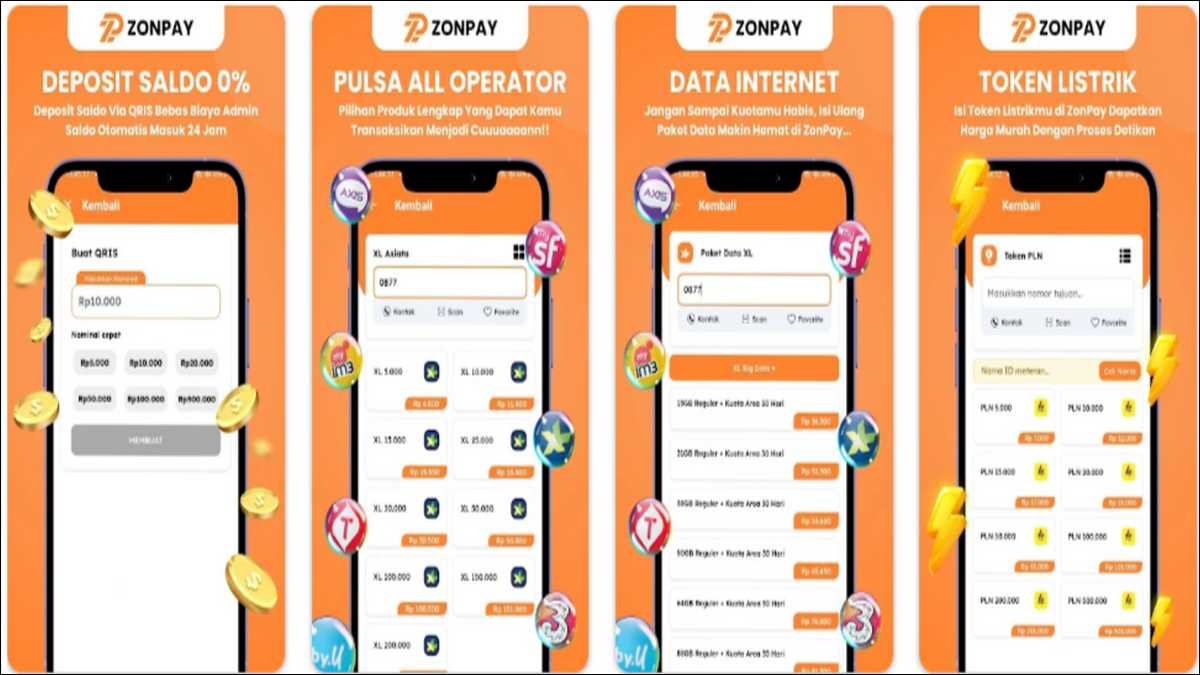
Users can pay with QRIS, buy phone credit and data packages, top up electricity tokens, and add money to e-wallets. Everything comes with low prices and very fast processing.
In this article, we are going to discuss thoroughly what Zonpay offers, how you use it step by step, its main features, and who it helps most. You will also see practical tips and things to consider before you download.
What Is Zonpay?
Zonpay is a mobile application that helps users to make quick digital payments to different merchants. A small team at Bagus Teknologi Indonesia built it to make daily tasks easier and cheaper.
You no longer need to jump between different apps just to recharge your phone or pay a bill.
The app works on your smartphone, so you can handle things anytime and anywhere. It fully supports Indonesia’s national QRIS standard. That means you scan one QR code and pay across many banks and wallets without hassle.
The last major update came on December 21, 2025. Right now, it has around 1,000+ downloads, as per the details available on Google Play store. The app is still growing, but it focuses on speed, low costs, and cashback offers that help you save a little every time.
Also read: Sniffies Android App Download Latest Version: UpToDown
Key Features Of Zon Pay That You’ll Like
Zonpay keeps the app clean and useful with these core tools.
- First, QRIS Payments. You simply scan a merchant’s QR code, enter the amount, and pay in seconds. No cash, no extra apps needed.
- Next, you can buy phone credit (pulsa) and data packages for all major operators. Prices are competitive, and the credit lands instantly.
- You can also top up PLN electricity tokens for your prepaid meter. Just enter your meter ID, choose the amount, and you are done.
- For e-wallet top-ups, you add balance to popular wallets with low fees. Everything processes fast.
On top of that, the app often runs promos and cashback. These small rewards add up if you use it regularly for daily needs.
All features sit inside one easy interface. You avoid switching apps and enjoy quick results every time.

How To Use Zon pay App:
Using the app feels natural. Here is exactly how it usually goes.
- Download Zonpay from the Google Play Store. It is rated for everyone and installs quickly.
- Open the app and complete any quick setup.
- For QRIS: Point your camera at the merchant’s QR code, type the amount, and confirm. The payment goes through in moments.
- For top-ups: Pick the service — pulsa, data, electricity, or e-wallet. Enter your number or meter ID, select the amount, and finish the transaction.
- You get a notification right away, and you can check your full history inside the app.
The whole process stays simple. Most transactions finish in seconds, so you spend less time on payments and more on your day.
This works great whether you handle your own needs or help family and friends with their recharges.
Security and How Your Data Is Handled
Safety matters the most when money is involved.
According to the details mentioned on Play store, Zonpay uses encryption to protect your information during every transaction. The developer says data stays secure with strong systems, and processing is fast so your details do not linger.
Still, like many apps, it may collect and share some personal or financial details with third parties. You can ask to delete your data if you want. Take a minute to read the privacy policy inside the app before you add important information.
So, we suggest you to use a strong password and avoid sharing your login details. Overall, the app is built for safe everyday use, especially for quick top-ups and scans.
Who Gets Most Benefits From Zonpay?
You will probably like Zonpay if you:
- Pay at shops or street vendors using QRIS and want it fast and simple.
- Buy phone credit, data packages, or electricity tokens often.
- Need to top up e-wallets without paying high fees.
- Enjoy small cashback and promos that lower your daily costs.
- Prefer a lightweight app without too many extra features.
It suits students, busy families, small vendors, and anyone moving toward cashless life in Indonesia. Because it supports the national QRIS standard, you can use it almost anywhere merchants accept QR codes — and that number keeps growing fast across the country.
Features Overview:
| Feature | What It Does | Benefit for You |
|---|---|---|
| QRIS Payments | Scan one code to pay merchants | Quick checkout, no cash needed |
| Pulsa & Data Packages | Buy credit and internet for all operators | Good prices, instant delivery |
| PLN Electricity Tokens | Top up your prepaid meter | Immediate power, skip the agent |
| E-Wallet Top-Up | Add balance to popular wallets | Low fees and fast transfers |
| Promos & Cashback | Special offers on many transactions | Small savings add up over time |
| Speed & Security | Fast processing with encryption | Peace of mind and less waiting |
This table gives you a clear picture of how each part fits into your routine.
Developer Background and How to Get Help
Bagus Teknologi Indonesia created Zonpay. The main contact is Bagus Setiawan, and the team is based in Jombang, East Java.
If you run into any issue, reach out easily:
- Email: zonpayhelp@gmail.com
- Phone: +62 858-1391-4765
The developer focuses on practical tools for Indonesian users. Because the app is still growing, you may not see hundreds of reviews yet. But the description and update history show a clear focus on speed and affordability.
Things to Keep in Mind Before You Download
Zonpay brings real convenience, but here are a few honest points to consider.
It has only 1K+ downloads so far, so it is smaller than the big players. You might find fewer user stories or community tips compared to more popular apps.
Prices and cashback look good, but always compare with your usual apps for each transaction. Sometimes one option beats another by a small margin.
You need a stable internet connection for live payments. You can often prepare details offline, but the final step requires data.
Take time to check what data the app collects. Only enter what you feel comfortable sharing.
Start small. Try one QRIS payment or a cheap top-up first. See how the speed and interface feel for you before you move bigger amounts.
Also read: Meesho IPO: GMP and Subscription Status Details
What This Looks Like in Real Life
Picture this: It is late evening and your phone data runs out. Instead of looking for a shop, you open Zonpay, pick your package, pay, and get connected again in seconds.
Or you stop at a small warung for lunch. You scan their QRIS code, pay instantly, and walk away without touching cash.
For families, one person can quickly buy electricity tokens or help relatives with credit. The cashback gives a nice little bonus each month.
These small moments show why simple apps like Zonpay fit so well into daily Indonesian life, especially as QRIS keeps spreading to more places.
Wrapping up!
Zonpay gives you an easy way to manage QRIS payments, pulsa, data, electricity tokens, and e-wallet top-ups all in one app. It focuses on speed, low prices, and basic security so your routine stays smooth.
If you want a no-frills tool that gets the job done without extra complexity, it is worth trying. Download the latest version from the Google Play Store, test a small transaction, and decide if it matches your habits.
Payments should feel quick and save you time. Zonpay aims to do exactly that for users across Indonesia. Check the current promos inside the app, because offers can change and help you save even more.
![20 Most Essential iPhone 16 Settings [iOS 26 Easy Tweaks]](https://www.techdemis.com/wp-content/uploads/2026/06/Essential-iPhone-16-Settings-800x450.webp)

![vnROM Bypass Complete Guide [2026]: How It Works, Android Compatibility, Security Risks & Alternatives](https://www.techdemis.com/wp-content/uploads/2026/06/vnROM-Bypass-Complete-Guide-800x450.webp)


